%%{init: {"gantt": {"leftPadding": 130}}}%%
gantt
accTitle: Agent Activity service lifecycle with default settings
accDescr {
A user opens the homepage at 0:00 and Workbench submits the AgentsView service job, which has up to 15 minutes to start.
The service's liveness check waits 15 minutes, then checks with Workbench every 5 minutes.
The user views Agent Activity until 0:15, and the 30-minute idle grace runs until 0:45.
The user's IDE session stays open until 1:05, so the service becomes eligible for cleanup at 1:05.
The session reaper runs every 30 minutes, so the sweep at 1:30 stops the service.
}
dateFormat HH:mm
axisFormat %H:%M
tickInterval 15minute
todayMarker off
section Startup
Homepage load submits job :milestone, 00:00, 0m
Service starting (up to 15 min) :00:00, 15m
section Liveness check
Grace (15 min) :live0, 00:00, 15m
Check every 5 min :after live0, 75m
section User interaction
Viewing Agent Activity :view, 00:00, 15m
Idle grace (30 min) :after view, 30m
IDE session open :ide, 00:00, 65m
Eligible for cleanup :after ide, 01:30
section Session reaper
Sweep :milestone, 00:30, 0m
Sweep :milestone, 01:00, 0m
Sweep stops the service :milestone, crit, 01:30, 0m
Agent Activity
WarningPreview feature
This feature is in preview. Preview features are unsupported and may face breaking changes in a future release. Any issues found in the feature will be addressed during the regular release schedule; they will not result in immediate patches or hotfixes.
We encourage customers to try these features and we welcome any feedback via Posit Support, but we recommend that the feature not be used in production until it is in general availability (i.e., officially released as a full feature). To provide feedback, please email your Posit Customer Success representative or sales@posit.co and specify that you are trialing this feature.
Agent Activity indexes transcripts in the user’s home directory from supported coding agents. It is disabled by default. When enabled, it runs an AgentsView service in a Launcher service job for each user while the feature is in use.
Agent Activity does not aggregate and export the user’s usage information for admin review.
This page covers deployment prerequisites, enablement, and service controls. For the navigation and usage walkthrough, see Agent Activity in the User Guide.
Configuration
Prerequisites
Before enabling Agent Activity, configure database-backed session storage with session-use-file-storage=0. Agent Activity does not support file-backed session storage.
Plan for one additional service job per user while the feature is in use, including the CPU, memory, and home-directory reads needed to index transcript history.
Configure a valid default session image and the session init container. The service job uses session-scoped mounts, and the init container delivers the AgentsView and service-proxy components.
If your users’ home directories are on NFS or another shared volume, confirm that the user-home mount in launcher-mounts resolves each user’s home directory in the service pod. See Configure NFS mounts for Launcher.
The service runs as the user and uses the AgentsView and service-proxy binaries installed with Workbench. The user’s home directory must be accessible from the selected cluster.
Enable Agent Activity
Add the following settings to /etc/rstudio/rserver.conf:
/etc/rstudio/rserver.conf
agentsview-enabled=1
session-use-file-storage=0Also enable session auto-update and configure your default session image:
/etc/rstudio/rserver.conf
launcher-sessions-auto-update=1
launcher-sessions-container-image=<session-image>
See Containerized sessions for the session image and init-container configuration. Use a session init image that matches your Workbench version.
The first start can take several minutes while the image is pulled and the user’s transcript history is indexed.
No additional settings are required.
By default, Workbench prefers a container-capable (Kubernetes) Launcher cluster when a session image is configured and launcher-sessions-auto-update=1 is set. Otherwise, it uses a Local or Slurm cluster. If you have more than one Launcher cluster configured, you can choose which one runs the service:
/etc/rstudio/rserver.conf
agentsview-cluster=<cluster-name>Workbench logs an error and does not start the service if the cluster is unknown or cannot run the required service job.
Restart Workbench after configuring these settings:
Terminal
sudo rstudio-server restartWhen enabled and available, Agent Activity appears in the header of the Workbench homepage.

Adjust service lifecycle
The following options in /etc/rstudio/rserver.conf control how long an idle service keeps running and how often it confirms that Workbench still needs it:
| Option | Default | Description |
|---|---|---|
agentsview-idle-grace-minutes |
30 |
Minutes without user-driven Agent Activity traffic, after the user has no live interactive sessions, before the job becomes eligible for cleanup. |
agentsview-liveness-check-minutes |
5 |
How often a running service checks that Workbench still considers it active. A service that repeatedly fails this check shuts itself down. Set to 0 to disable the check. |
When a user opens the Workbench homepage, it starts or reuses a Launcher system job running AgentsView for that user.
The service becomes eligible for cleanup after the user has no live interactive sessions and no user-driven Agent Activity traffic for the configured idle period. Background polling does not extend that period. Cleanup runs on the normal session-reaper-run-minutes schedule, so a job can remain running beyond the exact idle-grace boundary until the next sweep.
- Startup: Workbench allows up to 15 minutes for the service to start, which covers a cold image pull on Kubernetes. Agent Activity shows Starting while the Launcher reports the job as pending.
- Liveness check: 15 minutes after it starts, the service begins checking with Workbench every
agentsview-liveness-check-minutes. It shuts down as soon as Workbench reports that it should no longer be running, or after three consecutive failed checks. - Idle grace: The
agentsview-idle-grace-minutesperiod starts from the user’s last recorded Agent Activity use. Other homepage tabs and IDE sessions do not reset it. Workbench records this activity at most once per half idle-grace period, so the service can become eligible before a full period has passed since the user’s last action. - Interactive sessions: While the user has a live interactive session, the service is not eligible for cleanup, even after the idle grace ends.
- Session reaper: Sweeps run every
session-reaper-run-minutes(default30), on a schedule independent of the service. An eligible service is stopped at the next sweep.
Verify the deployment
- Sign in as a user whose home directory contains supported coding-agent history.
- Open Agent Activity from the Workbench homepage.
- Confirm that the status changes from Starting to the summary and activity views.
- Confirm that recent sessions and analytics appear after indexing completes.
For deployment failures, check the user’s Launcher system job and the Workbench server log. On Kubernetes, also inspect pod events and logs for image-pull, scheduling, init-container, and home-volume mount failures. The Kubernetes job name begins with workbench-agentsview-service.
Reference
Data and storage
The service reads supported coding-agent transcripts from the user’s home directory, including Claude Code history under ~/.claude/projects/, Codex history under ~/.codex/sessions/, and Posit Assistant history under ~/.posit/assistant/workspaces/. These files can contain prompts, source code, file paths, command output, and model responses. The service runs in the user’s context; Workbench authenticates requests and routes them to the corresponding per-user service.
The index has different persistence behavior by Launcher backend:
- On Kubernetes, the service pod performs indexing and rebuilds from transcripts in the mounted home directory when the pod is recreated. This is the most secure, and prevents tampering.
- On Local and Slurm clusters, the index is stored under
$HOME/.agentsviewand can be reused after the service restarts. The user has access to these files, and can make changes to them.
Recreating the index requires the original transcript files to remain accessible. Enabling Agent Activity does not install or enable a coding agent for users.
Troubleshooting
Status card
While the user’s AgentsView service is not answering, Agent Activity replaces the summary and tabs with a status card. Users see the same card and should contact you if it persists.
Starting means the service job has not yet answered. When the Launcher reports a status message for a pending job, the card shows that message in place of the default text. On Kubernetes, this is typically a pod event such as an image-pull back-off or a scheduling failure:
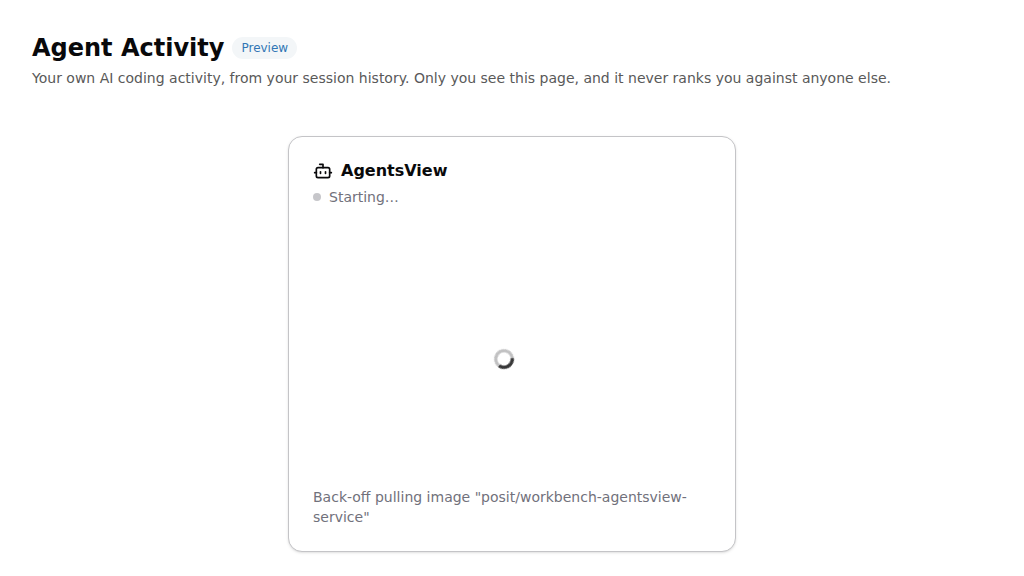
After 15 minutes the page stops relying on a pending job status and checks the service directly, so a job stuck in a pending state eventually surfaces as Not running.
Not running means the service job has exited, or the service did not answer within the startup window. If Launcher reported a status message for the job, the card shows it as Last reported status:
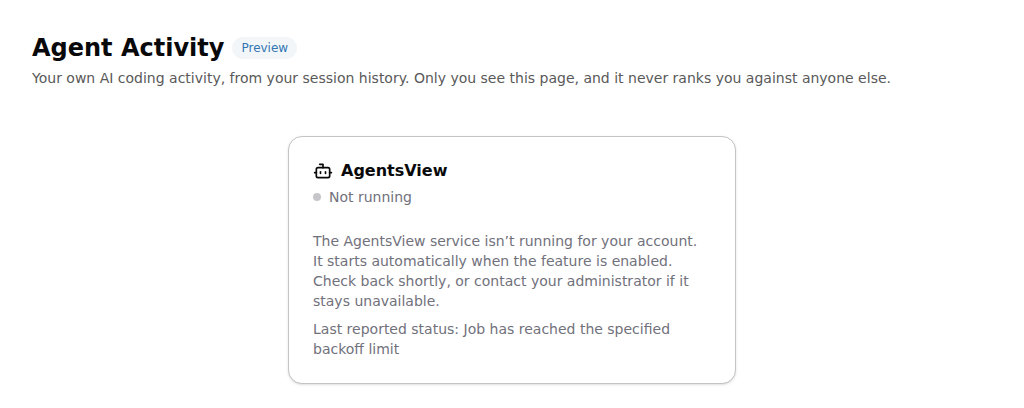
Use the status message as a starting point, and then check the user’s Launcher system job and rserver.log as described below. Reloading the homepage starts a new service job if none is running.
Common issues
| Symptom | Check |
|---|---|
| Agent Activity is absent from the navigation | Confirm agentsview-enabled=1, session-use-file-storage=0, and a resolvable user home (on Kubernetes, the launcher-mounts user-home mount). Restart Workbench after changing startup configuration. |
| The page remains on Starting | Check the user’s Launcher system job and rserver.log. On Kubernetes, check image-pull, scheduling, init-container, and volume-mount events. |
| The service job exits before becoming ready | Confirm that the selected cluster can access the user home. On Kubernetes, confirm launcher-sessions-auto-update=1 and a valid session init image. |
| The page loads but has no activity | Confirm that supported transcript files exist under the same home directory accessible to the service job. Allow the initial indexing operation to finish. Also check whether the home directory can mount, and permissions are correct. |
| The page is missing activity or shows stale activity | AgentsView aggregates on an interval of a few minutes, so it does not have new data available immediately. It can take a moment for refreshed information to appear. This is especially the case for first-time setups, or first-time agent usage for a given user. |
| Kubernetes data is temporarily missing after a service restart | The pod-local index is rebuilt from the transcript files in the user’s mounted home directory. Allow indexing to finish. |