Managing user access to Workbench
Overview
This page explains, at a high level, how key concepts work together to allow users to access a Posit Workbench session.
Key concepts
| Concept | Purpose |
|---|---|
| Authentication | Verify user identity |
| User provisioning | Create system accounts automatically or manually |
| PAM sessions | Set up server-side environment |
How user access works
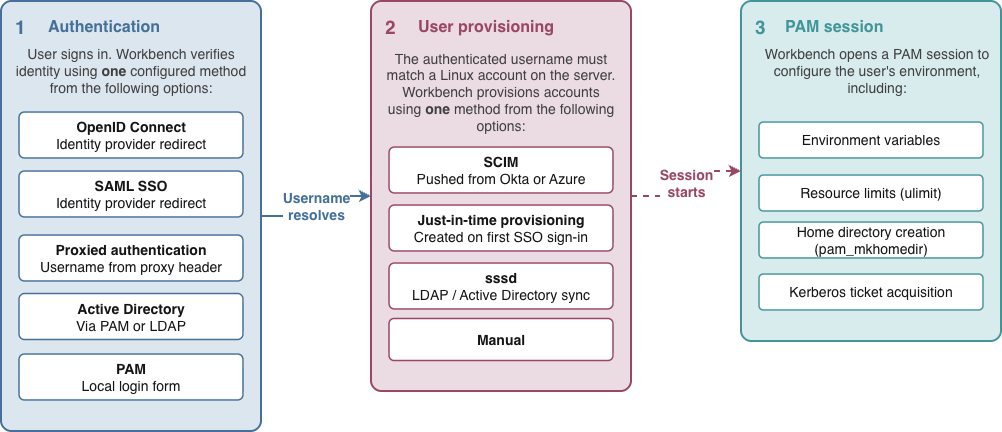
Workbench needs to do three things before a user can start an IDE session:
- Authenticate the user
- Map the user to a system account
- Set up the user’s Linux session
Choosing an authentication method
Where possible, Posit recommends using OIDC with Workbench to enable the most features (for example, integration with Azure and AWS Managed Credentials).
Workbench supports the following authentication methods:
| Your situation | Recommended method |
|---|---|
| Organization uses Microsoft Entra ID, Okta, or another OIDC provider | OIDC |
| Organization uses SAML SSO | SAML |
| Authentication handled by a reverse proxy (Shibboleth, SPNEGO/Kerberos SSO) | Proxied authentication |
| Users have LDAP or Active Directory accounts | PAM authentication via pam_sss (or pam_ldap on older systems) |
| Users have local accounts on the server | PAM authentication via pam_unix |
| Users authenticate via Kerberos | PAM authentication via pam_sss (or pam_krb5 on older systems) |
| Client-server protocols (RADIUS, smart cards) | Supported through PAM modules |
Choosing a provisioning method
Every authenticated user must correspond to a Linux account on the server, either local or networked. These accounts can be provisioned through several methods:
| Method | When to use | Supports groups? | Setup |
|---|---|---|---|
| SCIM | Using Okta, Microsoft Entra ID, or another IdP for full user and group sync | Yes, synced from the IdP | IdP sends account and group data to Workbench via SCIM API. See Configuration for user provisioning. |
| Just-in-Time (JIT) provisioning | Recommended for most SSO deployments: simple, automatic account creation on first sign-in | Yes, synced from your IdP at sign-in | Enable: user-provisioning-register-on-first-login=1. See Just-in-Time Provisioning. |
| LDAP / Active Directory (SSSD) | Existing on-premises directory service | Yes, from the directory | SSSD connects to LDAP/AD; PAM creates accounts on first sign-in via pam_mkhomedir. See Provisioning with sssd. |
| Manual account creation | Small deployments or strict IT control over accounts | Local groups only | IT admins manually create accounts with useradd before users sign in (for example: sudo useradd -m username). |
SCIM provisioning requires HTTPS with a CA-signed certificate. Self-signed certificates are not supported. You can configure SSL directly on Workbench or terminate TLS at a reverse proxy in front of it.
Linux session management with PAM
While PAM sessions are technically optional, Posit recommends enabling them for most deployments. Even when PAM is not used for authentication (for example, when using OIDC or SAML instead), PAM sessions handle critical server-side setup tasks for IDE sessions. These tasks include setting environment variables and resource limits, creating home directories, and acquiring Kerberos tickets (optional).
The majority of organizations rely on PAM sessions for automatic home directory creation. Without PAM sessions, home directories must be provisioned through another method before users can successfully launch sessions. You can safely omit PAM sessions only when home directories are guaranteed to already exist.
PAM sessions are disabled by default.
- Enable PAM sessions by setting
auth-pam-sessions-enabled=1in/etc/rstudio/rserver.conf. - For full details and guidance, see PAM Sessions & Kerberos.
| Your situation | PAM sessions needed? |
|---|---|
| Dynamic account provisioning (LDAP/SSSD, JIT, SCIM) | Yes. pam_mkhomedir (or pam_oddjob_mkhomedir on RHEL) creates home directories on first sign-in. |
| Filesystem-bound features in IDE sessions: Kerberos tickets, encrypted or remote mounts | Yes. Enable with password forwarding; modules run per session. |
| All user accounts and home directories pre-provisioned manually | No. There is no first-time sign-in to set up. |
| Workbench running in single-user mode without root privileges | No. Must be disabled; PAM sessions require root to open and close. |
For SCIM and JIT provisioning, Workbench installs a Name Service Switch (NSS) module at install time. This module allows the Linux OS to look up users and groups stored in the Workbench database, making provisioned users visible to PAM and other system tools. With AD/LDAP, the NSS module from SSSD is used instead.