Azure Kubernetes Service
Posit Workbench can be configured to run on a Kubernetes cluster within Azure using Azure Kubernetes Service (AKS). This architecture is designed for the reliability and scale that comes with a distributed, highly available deployment where user sessions and jobs run in isolated Pods. This architecture is best suited for organizations that already use Kubernetes for production workloads or have specific needs that are not provided by our load-balanced architecture.
Architectural overview
This Workbench deployment uses the Team Operator and its Site CRD as the primary deployment method. The Posit public Helm charts are an alternative for teams who prefer direct Helm management. It additionally leverages:
- Azure Kubernetes Service (AKS) to provision and manage the Kubernetes cluster.
- Azure Database for PostgreSQL Flexible Server, serving as the application database for Workbench.
- Azure NetApp Files, a networked filesystem used to store user home directories and shared configuration, mounted across Workbench services.
- Traefik ingress controller to route requests to the Workbench service and handle TLS termination.
- Azure Container Registry (ACR), from which the cluster pulls container images via managed identity.
This architecture requires Kubernetes 1.30 or later.
Architecture diagram
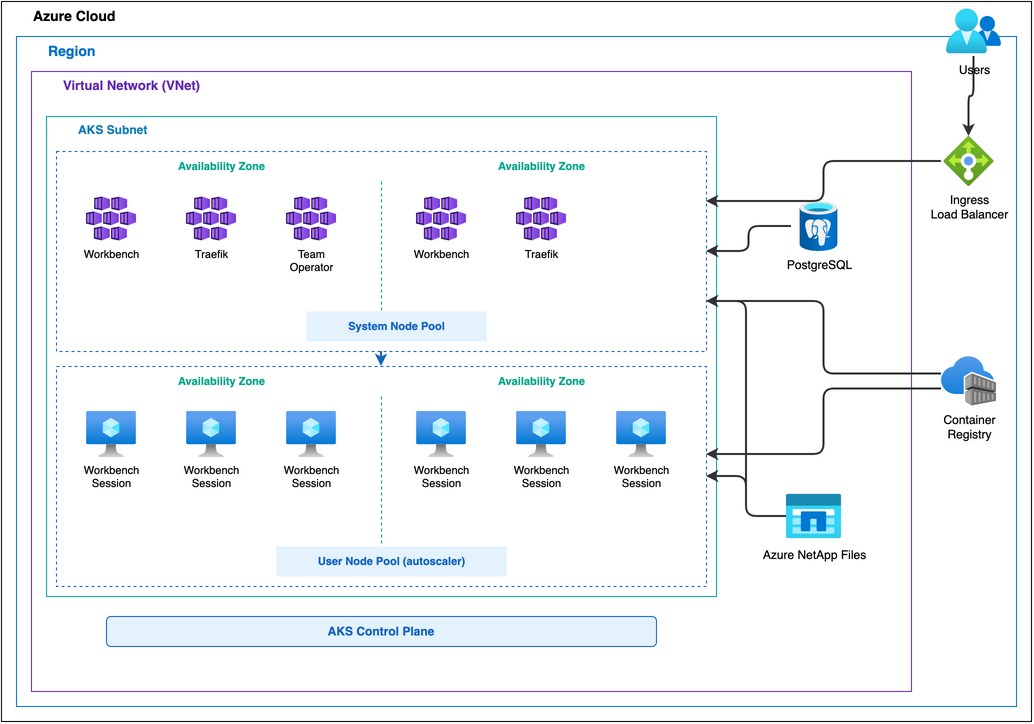
Kubernetes cluster
Azure’s AKS is configured with the following:
- Azure CNI Overlay networking with Calico network policy
- Workload Identity with OpenID Connect (OIDC) for managed identity integration
- A system node pool for persistent components, such as the main Workbench server component
- A user node pool with cluster autoscaler enabled to manage autoscaling of the Workbench session nodes
The Team Operator deploys in the posit-team-system namespace and manages Workbench in the posit-team namespace via the Site CRD. The Site CRD configures products, authentication, storage, and image versions.
The Team Operator abstracts Helm chart configuration via the Site CRD. Teams who prefer direct Helm management can deploy Workbench without the Team Operator using Posit’s public Helm charts. The Posit Helm Charts guide documents ingress configuration.
The AKS cluster pulls container images from an Azure Container Registry (ACR) via managed identity. The kubelet managed identity requires the AcrPull role assignment on the registry. For details on required images and configuration, see the Containerized sessions section of the Job Launcher documentation.
Nodes
Choose VM sizes that fit several sessions per node without wasting capacity. Estimate how many concurrent sessions will run, and how much CPU and memory each session needs. A good target is two or three average sessions per node.
The VM size must also accommodate the largest session that can run in the cluster. For most deployments, D-series v5 instances balance compute and memory well. Common choices are Standard_D4_v5 (4 vCPU, 16 GiB) or larger variants from the same family. Select based on expected memory usage per CPU core.
Two node pools:
- System node pool:
Standard_D4_v5. Hosts persistent Workbench server components and the Team Operator. - User node pool:
Standard_D4_v5with cluster autoscaler enabled. Hosts Workbench session Pods.
The AKS cluster autoscaler manages the user node pool. Autoscaling is optional but recommended for cost savings. It requires:
- Node
taintson the user node pool to prevent non-session Pods from scheduling there. - Matching
tolerationson launched sessions so session Pods can schedule on the user node pool. - Node
affinityon launched sessions to ensure session Pods run only on the user node pool. - Session timeouts so idle sessions shut down, allowing the autoscaler to scale down unneeded nodes.
AKS Node Auto-Provisioning (NAP) requires Cilium CNI and is a future consideration. The architecture uses the standard AKS cluster autoscaler instead.
The Azure VM sizes documentation covers the full range of available instance types.
Database
Workbench requires a PostgreSQL database for internal metadata. Provision an Azure Database for PostgreSQL Flexible Server with an empty database. The server is VNet-injected via a delegated subnet and must be reachable by all Workbench hosts. PostgreSQL Flexible Server supports zone-redundant high availability for additional resiliency.
Storage
Azure NetApp Files provides Workbench home directories and shared storage. NFS volumes are pre-provisioned as static Persistent Volumes (PVs). The Team Operator creates Persistent Volume Claims (PVCs) that bind to these static PVs. See the Team Operator documentation for configuring Azure NetApp Files volumes in the Site CRD.
For detailed performance characteristics, see the Storage documentation of the Getting Started guide.
Load balancer
A Traefik ingress controller deploys in the posit-team namespace and handles ingress, load balancing, and TLS termination. Traefik uses a static public IP attached to an Azure Load Balancer, providing the single entry point for all user traffic.
Traefik’s built-in ACME client handles TLS using Let’s Encrypt with a DNS-01 challenge against the Azure DNS zone. This requires Workload Identity binding for Traefik so it can update DNS records to complete the challenge. The resulting wildcard certificate covers all subdomains in the zone.
Networking
An Azure Virtual Network provides three subnets:
- AKS Subnet: Hosts the AKS cluster, including the Traefik load balancer
- Database Subnet: Delegated to Azure Database for PostgreSQL Flexible Server (VNet-injected)
- NetApp Subnet: Delegated to Azure NetApp Files (Microsoft.NetApp/volumes)
Network Security Groups (NSGs) allow load balancer health probes and HTTP/HTTPS inbound traffic on the AKS subnet. The cluster uses Azure CNI Overlay and Calico network policy.
Configuration details
This architecture places Workbench behind a load balancer or reverse proxy. Configure the proxy according to the instructions on the Running with a Proxy page. Workbench sessions might fail to connect or the user interface might not load correctly if the proxy is not correctly configured.
For session autoscaling to work effectively, configure Workbench sessions with timeouts so idle sessions shut down, allowing the cluster autoscaler to scale down unneeded nodes. See the session timeout settings for RStudio Pro, Jupyter, VS Code, and Positron.
Resiliency and availability
Workbench runs in multiple replicas spread across Availability Zones. Traefik handles load balancing and TLS termination at the ingress layer. The deployment survives the loss of any single Pod or Availability Zone.
Azure Database for PostgreSQL Flexible Server supports zone-redundant high availability with automatic failover. Azure NetApp Files provides built-in redundancy configurable to match availability requirements.