HTTP headers
This page covers HTTP headers that Posit Connect sets or removes, custom header configuration, Content Security Policy (CSP), and defenses against cross-site request forgery. It is for Connect administrators who configure the server. Before you begin, become familiar with the server configuration file and HTTP headers. See Security, HTTPS and TLS, and Sessions and sign-in for related guidance.
Server header
Connect sets the Server HTTP header to Posit Connect. The header never includes the version or build, so it does not advertise which release you are running. Configure Server.ServerName to replace the header with any string of your choosing.
Content type sniffing
Use the Server.ContentTypeSniffing setting to configure HTTP responses with the X-Content-Type-Options header. This header can protect your users from a certain class of malicious uploads.
When Server.ContentTypeSniffing is disabled (the default), Connect sets the X-Content-Type-Options HTTP header to nosniff. This instructs browsers not to inspect the content in an attempt to identify its type.
When Server.ContentTypeSniffing is enabled, Connect does not send the X-Content-Type-Options HTTP header. Browsers are free to analyze the content to detect its type.
Header sanitization
Connect strips the following headers from requests when proxying traffic to subordinate content processes:
X-Rsc-AuthorizationX-Rsc-XsrfAuthorization
Instead of relying on headers to authenticate users to content, add them as viewers or collaborators in content Access settings.
Custom headers
Use the Server.CustomHeader setting to add custom HTTP headers to all Connect responses when other Connect features do not cover them.
Custom headers can support security practices that Connect does not offer as explicit options elsewhere. For example, custom headers can configure the X-XSS-Protection header, CSP, HTTP Public Key Pinning (HPKP), and Cross-origin Resource Sharing (CORS).
Set Server.CustomHeader to a header name and value separated by a colon. Connect trims whitespace around the header name and value. Set this option multiple times, as in the following example:
/etc/rstudio-connect/rstudio-connect.gcfg
[Server]
CustomHeader = "HeaderA: some value"
CustomHeader = "HeaderB: another value"Connect adds custom headers to the HTTP response early during request processing. Other header settings can later overwrite or modify custom header values. Custom headers can conflict with other Connect settings that set response headers. These include Server.ServerName and Server.ContentTypeSniffing, the frame options, SameSite cookie, and CORS settings in Embedding and cross-origin access, and HTTP Strict Transport Security (HSTS) in HTTPS and TLS. Connect and application or API frameworks such as Flask, Plumber, or Shiny also use internal headers that can overwrite or modify custom header values. Do not depend on a custom header that conflicts with a header already in use by Connect.
Content Security Policy
CSP is a security standard that helps prevent cross-site scripting (XSS), clickjacking, and other code injection attacks. These attacks can result from malicious content running in a trusted web page context. It is a declarative policy that lets server administrators tell clients which sources an application expects to load resources from.
Connect lets administrators set a CSP by adding a CustomHeader value to the server configuration file.
With the following CSP directive, Connect loads and allows user interaction.
/etc/rstudio-connect/rstudio-connect.gcfg
[Server]
CustomHeader = "Content-Security-Policy: script-src 'self'"
However, Connect hosts user-generated content from multiple frameworks, so the preceding CSP directive does not work for all content. The following CSP directives let each supported content type load and allow user interaction. Replace the recommended <CSP Value> in the CustomHeader directive with the value for that content type in the table.
/etc/rstudio-connect/rstudio-connect.gcfg
[Server]
CustomHeader = "Content-Security-Policy: <CSP Value>"| Content Type | <CSP Value> |
|---|---|
| Bokeh App | script-src 'self' 'unsafe-inline' |
| Panel App | script-src 'self' 'unsafe-inline' |
| Jupyter Notebook | script-src 'self' 'unsafe-inline' 'unsafe-eval' https://cdnjs.cloudflare.com |
| Parameterized R Markdown Document | script-src 'self' 'unsafe-inline' data: https://mathjax.rstudio.com |
| Pin | script-src 'self' 'unsafe-inline' |
| Plumber API | script-src 'self' 'unsafe-inline' |
| Python API | script-src 'self' 'unsafe-inline' |
| Python FastAPI | script-src 'self' 'unsafe-inline' |
| Python Shiny App | script-src 'self' 'unsafe-inline' 'unsafe-eval' |
| Quarto Content | script-src 'self' 'unsafe-inline' |
| R Markdown Document | script-src 'self' 'unsafe-inline' data: https://mathjax.rstudio.com |
| Shiny App | script-src 'self' 'unsafe-inline' 'unsafe-eval' |
| Streamlit App | script-src 'self' 'unsafe-inline' 'unsafe-eval' |
| Vetiver API | script-src 'self' 'unsafe-inline' |
| Voilà Dashboard | script-src 'self' 'unsafe-inline' 'unsafe-eval' https://cdnjs.cloudflare.com https://unpkg.com |
Replace 'unsafe-inline' with a hash value to restrict the sources of scripts more tightly. The following example uses a hash value instead of 'unsafe-inline' in the CSP directive:
/etc/rstudio-connect/rstudio-connect.gcfg
[Server]
CustomHeader = "Content-Security-Policy: script-src 'self' 'sha256-gPjlli1HEdLlR0AZTY971/wQVOdSkl9mEinLnxrPpJw='"
Some frameworks generate scripts dynamically, so frequent hash changes can make a CSP directive unsustainable. Future framework upgrades that change their scripts also require new hashes.
To host multiple content types on a Connect server, include the CSP requirements for every expected content type. For example, if you expect to host both Jupyter Notebooks and R Markdown documents, set the CSP directive as follows:
/etc/rstudio-connect/rstudio-connect.gcfg
CustomHeader = "Content-Security-Policy: `script-src 'self' 'unsafe-inline' 'unsafe-eval' https://cdnjs.cloudflare.com data: https://mathjax.rstudio.com`"More information about Content-Security-Policy can be found at:
How Connect prevents CSRF
Cross-Site Request Forgery (often abbreviated as CSRF or XSRF) is an attack that forces an end user to execute unwanted actions on a web application in which they are currently authenticated.
References:
Connect uses a common mitigation strategy called “Cookie-to-header” token validation.
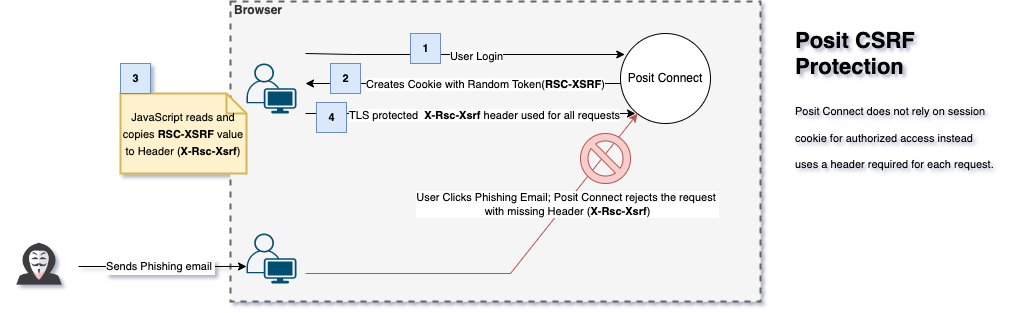
When a user starts a session [1], Connect creates a cookie (RSC-XSRF) [2] that contains a cryptographically secure, random token. JavaScript running on the client reads the token from this secure cookie and copies it into a custom HTTP header (X-Rsc-Xsrf) [3] for each transactional request. The server validates the token’s presence and integrity by comparing the request header with the cookie. [4] Attacker cannot perform the CSRF attack without the header which is made unavailable by TLS.
The RSC-XSRF cookie cannot be set as “http-only” as it is required that Javascript is able to read the cookie value in order to set the request header.
Not setting “http-only” is not specific to Connect, but is a universal requirement for using “cookie-to-header” mitigation. This technique is implemented by many modern frameworks, such as Django and Angular.