Anthropic
The Anthropic integration allows content running on Posit Connect to access the Anthropic API using a shared API key and, for organization-scoped keys, an optional workspace ID. When content is associated with an Anthropic integration, Connect sets the ANTHROPIC_API_KEY environment variable and, when configured, the ANTHROPIC_WORKSPACE_ID environment variable.
This integration is useful when you want to:
- Share a single Anthropic API key across multiple pieces of content.
- Centrally manage and rotate API keys without redeploying content.
- Audit which content is using Anthropic.
| Component part | Value |
|---|---|
| Provider registration | An API key created in the Anthropic Console, and optionally an Anthropic workspace ID |
| Authentication types | Environment variables |
| Configuration | api_key (sensitive), workspace_id (optional, non-sensitive) |
| Credential delivery | Environment variables: ANTHROPIC_API_KEY, ANTHROPIC_WORKSPACE_ID |
| Content compatibility | Interactive and rendered content; public access and share links supported |
Provider registration
Performed by an Anthropic administrator.
Obtain an Anthropic API key
The Anthropic administrator creates an API key in the Anthropic Console.
Anthropic API keys should be treated as sensitive credentials. Consider creating a dedicated API key for use with Connect so it can be rotated or revoked independently.
Obtain an Anthropic workspace ID
Organization-scoped API keys require a workspace ID. In the Anthropic Console, open Settings > Workspaces, select the workspace, and copy its workspace ID. Workspace-scoped API keys do not require a workspace ID.
Transfer information to Connect administrator
The Anthropic administrator shares the API key and, when applicable, the workspace ID with the Connect administrator.
Authentication types
The Anthropic integration supports only the environment variables authentication type. There is no viewer identity and no service account identity: every content item associated with the integration uses the same API key, and every viewer sees the same behavior.
Because no viewer identity is involved, this integration supports both interactive and rendered content, and both public access and share links.
Connect configuration
Performed by a Connect administrator.
Create the integration in Connect
Using the information from the Anthropic administrator, the Posit Connect administrator creates an integration through the dashboard’s System > Integrations settings. Once the integration has been created in Connect, it is available for use by all publishers. See Access control lists for information on customizing access to specific users or groups.
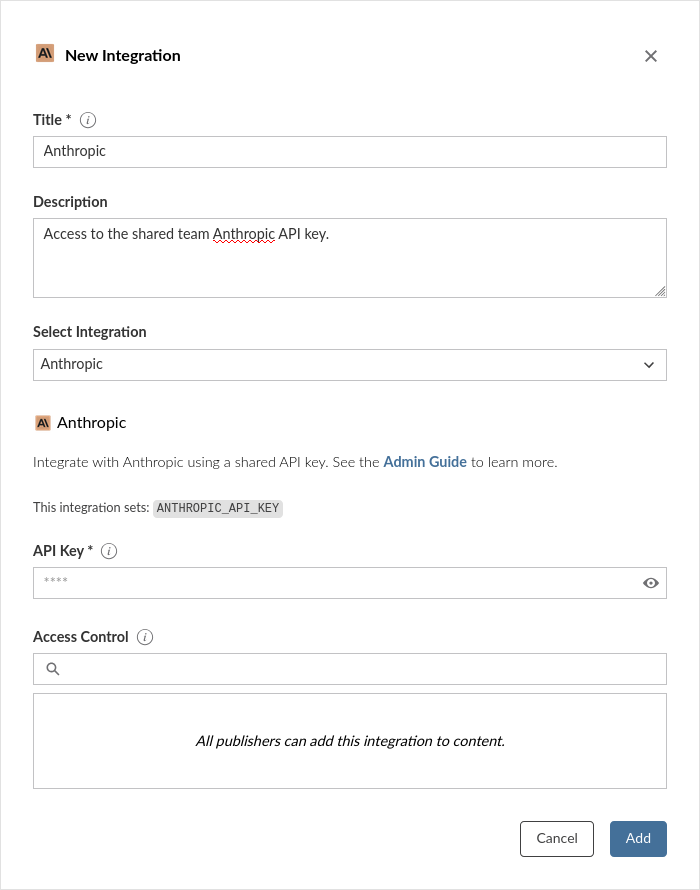
Alternatively, the example below shows how to create an Anthropic integration using curl and the Connect Server API.
Replace connect.example.org with the address of the Connect server.
Terminal
curl -H "Authorization: Key ${CONNECT_API_KEY}" \
  -XPOST https://connect.example.org/__api__/v1/oauth/integrations \
  --data '{
    "template": "anthropic",
    "name": "Anthropic",
    "description": "A helpful description for publishers to use when choosing an integration for their content.",
    "config": {
      "api_key": "<anthropic-api-key>",
      "workspace_id": "wrkspc_..."
    }
  }'
# 200 OK
# {"guid": "<integration-guid>", ... }
The api_key field is a sensitive field: it is encrypted at rest and never returned by the Connect Server API. The workspace_id field is optional and non-sensitive. Only configure workspace_id when the API key is organization-scoped.
Credential delivery
Connect sets ANTHROPIC_API_KEY and, when configured, ANTHROPIC_WORKSPACE_ID in the environment of every content process associated with this integration, decrypting the stored key at process launch. Content receives the real API key.
Rotating the key is a single edit to the integration. Content processes pick up the new value the next time they start. No redeploy is required.
See Credential delivery for the properties and limits of this mechanism.
Some Anthropic SDKs may not handle the ANTHROPIC_WORKSPACE_ID environment variable automatically, so publisher code may need to read it and pass the anthropic-workspace-id header when constructing its Anthropic client.
Publisher usage
Before an integration works in content, a publisher must associate it with that content. See Adding integrations to deployed content in the Connect User Guide for the steps. A publisher can also request the association from manifest.json. See Automatically associating integrations.
Once the integration is configured, publishers can use it in their content. Most Anthropic client libraries detect the ANTHROPIC_API_KEY environment variable by default:
from anthropic import Anthropic

# The client automatically uses the ANTHROPIC_API_KEY environment variable
client = Anthropic()

message = client.messages.create(
    model="claude-sonnet-4-20250514",
    max_tokens=1024,
    messages=[{"role": "user", "content": "Hello!"}]
)library(ellmer)
chat <- chat_anthropic()
chat$chat("Tell me three jokes about statisticians")Local development
When developing locally, set the ANTHROPIC_API_KEY environment variable in your development environment, or use a .env file. The content will use your local API key during development and the Connect-managed key when deployed.