Identity Federation
Enhanced Advanced Early Access
Identity federation allows a Posit Connect server to map external OpenID Connect (OIDC) identity tokens to existing Connect users. The most common case of this is when Connect and another service share the same single sign-on provider and end users.
In particular, identity federation can allow Posit Workbench users to publish content to Connect without requiring separate Connect credentials. Posit-provided client libraries support this flow automatically when available.
Identity federation with Posit Workbench
Prerequisites
- The
EarlyAccess.IdentityFederationsetting must be enabled in Connect. - Workbench must be configured with OIDC authentication.
- Connect must use OpenID Connect authentication with the same identity provider as Workbench. See How Connect finds the user.
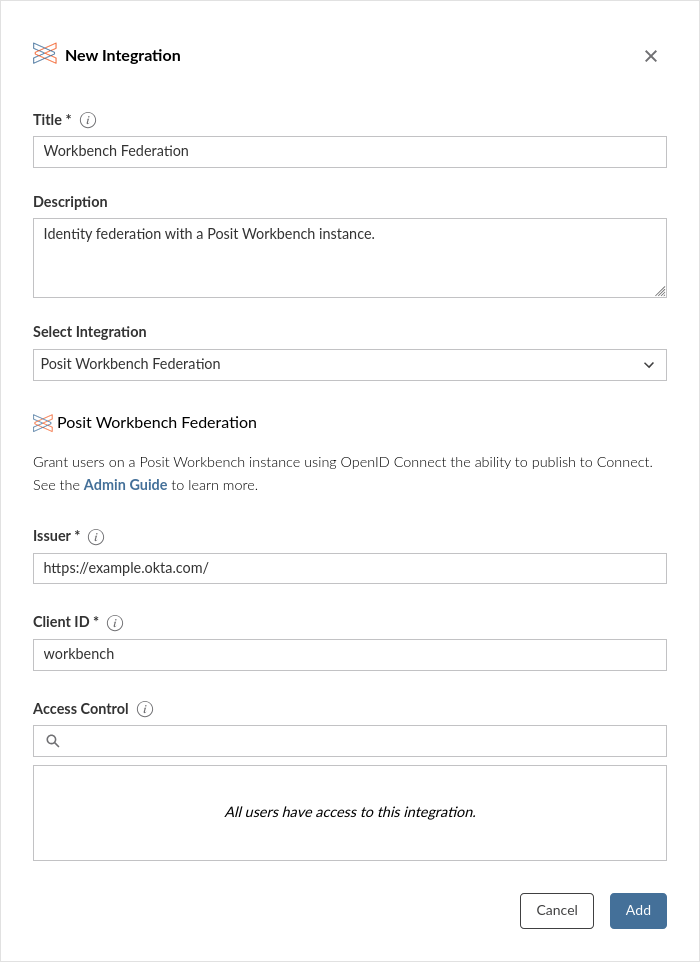
- The Connect administrator must know the OIDC issuer and client ID for Workbench.
Create the integration
The Posit Connect administrator creates a Posit Workbench Federation integration through the dashboard’s System > Integrations settings. Once the integration has been created in Connect, it is available for use by all publishers.
Generic identity federation
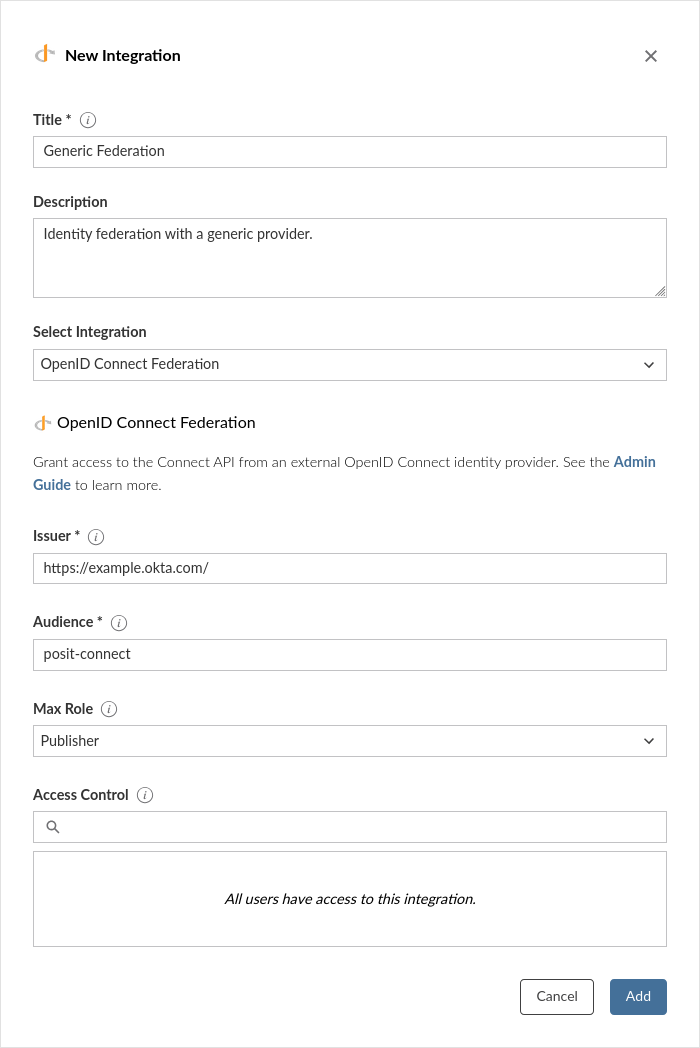
For custom identity federation cases, there is also a generic OIDC integration template.
Prerequisites
- The
EarlyAccess.IdentityFederationsetting must be enabled in Connect. - The identity provider that issues the tokens must identify each user with the same value that Connect stored for that user. Usually, this means that Connect uses OpenID Connect authentication with the same identity provider. See How Connect finds the user.
Create the integration
The Posit Connect administrator creates an OpenID Connect Federation integration through the dashboard’s System > Integrations settings. Once the integration has been created in Connect, it is available for use by all users.
How Connect selects the integration
A caller does not choose the identity federation integration. Connect selects it from the iss and aud claims of the identity token. Connect uses the oldest identity federation integration whose issuer equals the iss claim, and whose audience is in the aud claim. This includes both OpenID Connect Federation and Posit Workbench Federation integrations. If no integration matches, Connect refuses the token.
The selected integration supplies these settings for the request:
- The claim that identifies the user. See How Connect finds the user.
- The maximum role of the caller.
- The access control list (ACL) that decides which users can use identity federation.
Do not create two identity federation integrations with the same issuer and audience. Connect uses only the oldest one, and ignores the settings and the ACL of the other.
How Connect finds the user
Connect reads one claim from the identity token. For an OpenID Connect Federation integration, it is the claim that match_claim names. If match_claim is not set, and for a Posit Workbench Federation integration, it is the claim that OAuth2.UniqueIdClaim names. OAuth2.UniqueIdClaim is sub by default.
Connect then looks for the user whose unique ID equals the value of that claim. When a user signs in to Connect with OpenID Connect, Connect stores the value of OAuth2.UniqueIdClaim as the unique ID of the user. Identity federation does not create users. If no user matches, Connect refuses the token.
The values match when Connect and the token issuer use the same identity provider, and the claims have the same value. They do not match when Connect uses another authentication provider, such as password authentication or LDAP. Those providers store unique IDs that no identity provider claim contains.
Troubleshooting
- Verify that the issuer in the integration configuration matches the
issclaim in the identity tokens exactly. - Check that Connect can reach the OIDC provider’s discovery endpoint at
<issuer>/.well-known/openid-configuration. - The user must already exist on Connect; identity federation does not provision new users automatically.
- Make sure that the matched claim in the identity token has the same value as the unique ID of the user in Connect. See How Connect finds the user.
- For Workbench identity federation, ensure that the
rserver.confconfiguration includesauth-openid-scopes=offline_access. Without this setting, identity tokens will expire approximately one hour after user sign-in, causing further identity federation requests to Connect to fail.