Palantir Foundry
The Palantir Foundry integration allows content running on Posit Connect to access Foundry resources using the content viewer’s Foundry identity.
Currently, the only supported way to interact with Foundry is through the Palantir SDK, which is available in Python and TypeScript.
| Component part | Value |
|---|---|
| Provider registration | A confidential Developer Console application in Palantir Foundry |
| Authentication types | Viewer only |
| Configuration | auth_type, auth_mode, foundry_hostname, client_id, client_secret (sensitive), scopes |
| Credential delivery | Token exchange |
| Content compatibility | Interactive content only; public access and share links not supported |
Provider registration
Performed by a Palantir Foundry administrator.
Create a Developer Console application
The Palantir Foundry administrator registers a new Developer Console application. Connect supports integrations only with Palantir Foundry applications that use confidential clients and viewer authentication.
Viewer integration
The Palantir Foundry administrator adds a redirect URL for the OAuth application. Palantir Foundry sends the user credentials to the redirect URL at the end of the OAuth handshake, allowing Connect to obtain a temporary access token and refresh token.
The OAuth application is configured with the following redirect URL (sometimes referred to as a callback URL): https://connect.example.org/__oauth__/integrations/callback. Replace connect.example.org with the address of the Connect server.
Transfer information to Connect administrator
The Palantir Foundry administrator shares the following information with the Connect administrator:
| Field | Description |
|---|---|
foundry_hostname |
The Palantir Foundry hostname |
client_id |
The unique identifier of the application in Palantir Foundry. |
client_secret |
The secret string configured under OAuth & Scopes. |
Authentication types
This integration supports the Viewer authentication type only, using a confidential client. Because a viewer identity is required, it supports interactive content only, and neither public access nor share links.
Connect configuration
Performed by a Connect administrator.
Create the integration in Connect
Using the information from the Palantir Foundry administrator, the Posit Connect administrator creates an integration through the dashboard’s System > Integrations settings. Once the integration has been created in Connect, it is available for use by all publishers. See Access control lists for information on customizing access to specific users or groups.
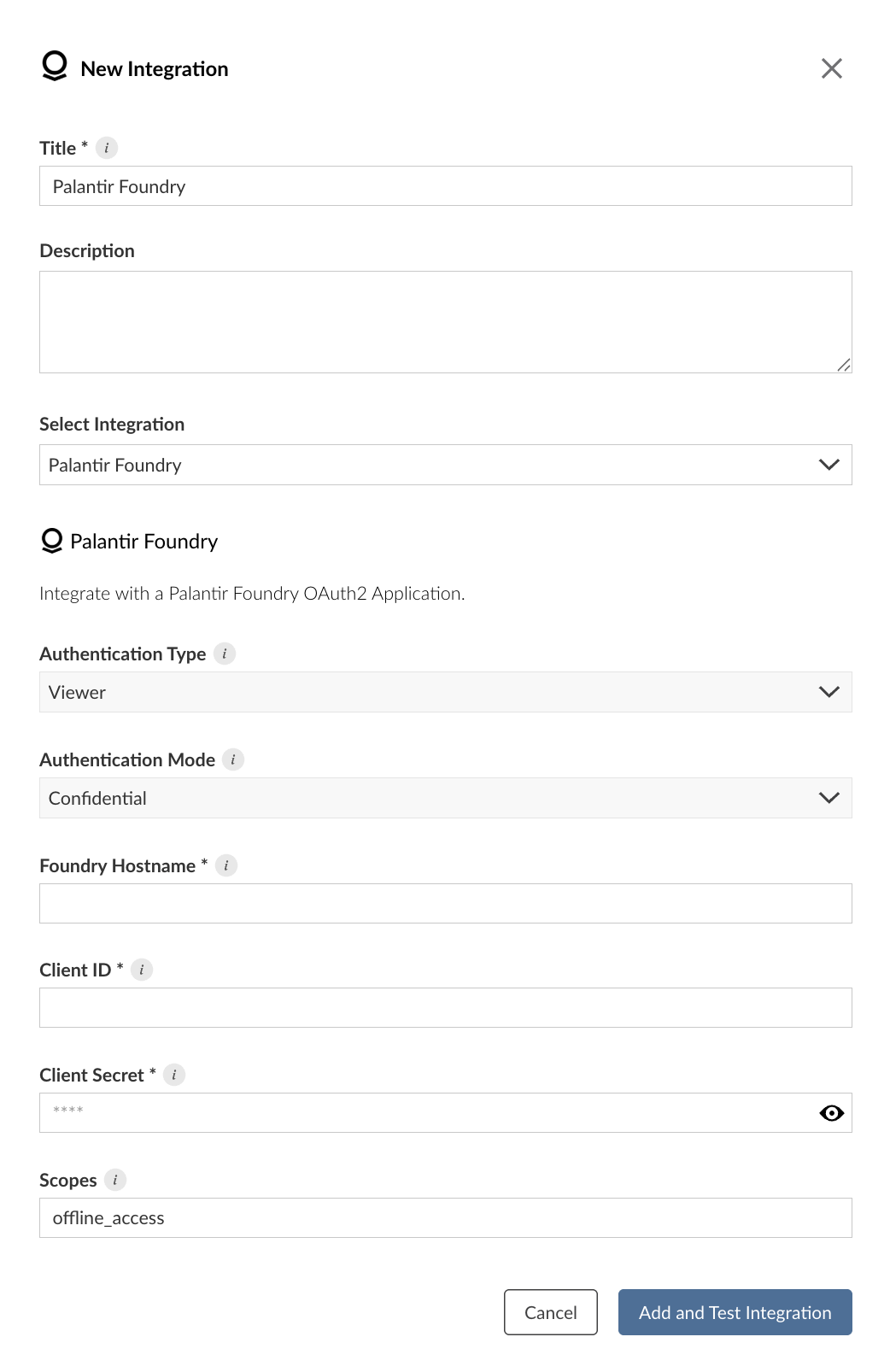
Alternatively, the example below shows how to create a Palantir Foundry integration using curl and the Connect Server API. Replace connect.example.org with the address of the Connect server.
Terminal
curl -H "Authorization: Key ${CONNECT_API_KEY}" \
  -XPOST https://connect.example.org/__api__/v1/oauth/integrations \
  --data '{
    "template": "palantir-foundry",
    "name": "Palantir Foundry Application",
    "description": "A helpful description for publishers to use when choosing an integration for their content.",
    "config": {
      "foundry_hostname": "<foundry-hostname>"
      "client_id": "<client-id>",
      "client_secret": "<client-secret>"
    }
  }'
# 200 OK
# {"guid": "<oauth-integration-guid>", ... }
Credential delivery
Content receives the viewer’s OAuth access token through the Connect credential exchange endpoint, presenting the viewer’s user session token as the subject token. The viewer must first complete the integration’s login flow. Refresh tokens are never delivered to content.
See Token exchange for the general mechanism.
Publisher usage
Before an integration works in content, a publisher must associate it with that content. See Adding integrations to deployed content in the Connect User Guide for the steps. A publisher can also request the association from manifest.json. See Automatically associating integrations.
Once the integration is configured, publishers can use it in their content. See the following cookbook recipe for an example: