Connect API
The Connect API integration is the one integration whose provider is Posit Connect itself. Rather than delivering a third-party credential, it delivers a short-lived Connect API key that acts as the content viewer, so content can call the Connect Server API on that viewer’s behalf.
Connect automatically provides a default Connect API integration. Publishers can choose to associate the integration with their content. The default integration can be removed by an administrator through the dashboard’s System > Integrations settings.
| Component part | Value |
|---|---|
| Provider registration | None. Connect is the provider. |
| Authentication types | Visitor API Key, a sub-type of Viewer |
| Configuration | max_role |
| Credential delivery | Ephemeral Connect API key |
| Content compatibility | Interactive content only; public access and share links not supported |
Provider registration
None required. Connect issues the credential itself, so there is no external system to register with and no secret to transfer.
Authentication types
This integration uses the Visitor API Key authentication type, a sub-type of Viewer. It follows the same rules as any Viewer integration: interactive content only, no public access, no share links, and the viewer must be a named user on the server.
The Connect API integration operates on the publisher trust model. Once this integration is enabled, publishers can associate it with their content. This allows them to write applications that can interact with the Connect API on behalf of the users visiting their applications.
Maximum role
API keys confer both a set of content access permissions and a server role (in decreasing order of privileges: Administrator, Publisher, and Viewer). The integration can be configured to limit the role that content can assume, and it is important to set this as restrictively as possible. The role assumed by the ephemeral API key is the minimum of the configured maximum role and the content visitor’s role.
For example, an integration with a maximum role of Administrator lets published content make API calls with Administrator privileges when an Administrator uses it. An integration with a maximum role of Publisher caps the role of the ephemeral API key at Publisher, even when an Administrator uses it.
Connect configuration
The Connect administrator creates an integration through the dashboard’s System>Integrations settings. Once the integration has been created in Connect, it is available for use by all publishers. See Access control lists for information on customizing access to specific users or groups.
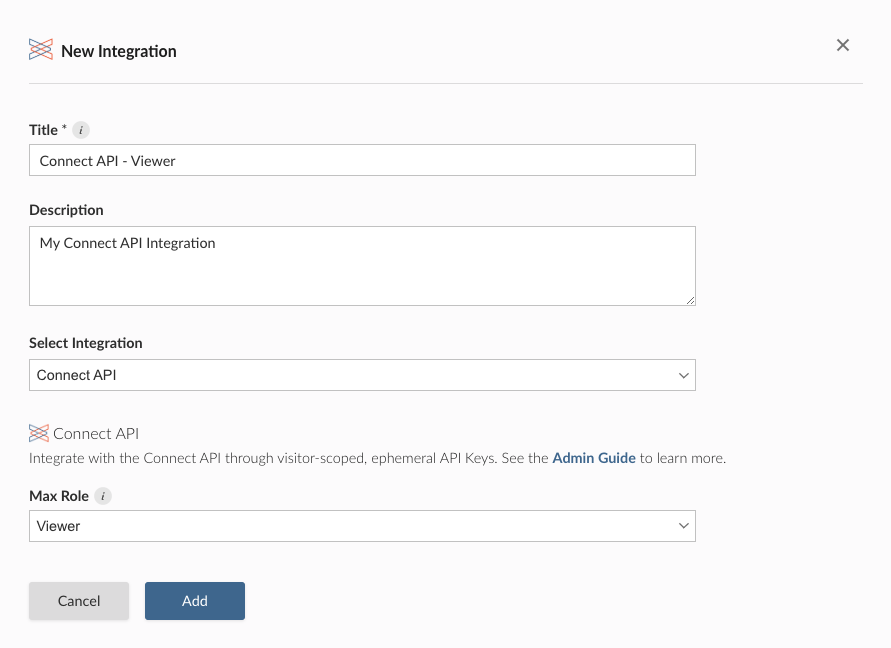
Alternatively, the example below shows how to create a Connect API integration with a maximum authorization role of Viewer using curl and the Connect Server API. Replace connect.example.org with the address of the Connect server.
Terminal
curl -H "Authorization: Key ${CONNECT_API_KEY}" \
  -XPOST https://connect.example.org/__api__/v1/oauth/integrations \
  --data '{
    "template": "connect",
    "name": "Connect API integration",
    "description": "A helpful description for publishers to use when choosing an integration for their content.",
    "config": {
      "max_role": "Viewer"
    }
  }'
# 200 OK
# {"guid": "<integration-guid>", ... }
Credential delivery
Content performs a credential exchange, presenting the user session token of the viewer as the subject_token and requesting the urn:posit:connect:api-key token type. Connect returns an ephemeral Connect API key carrying the viewer’s identity, at a role no higher than the integration’s configured max_role.
Ephemeral keys are bound to the content process that requested them and are deleted when it exits, so a key stops working across a content restart. Publishers must refresh their client from the latest user session token rather than caching the key.
Publisher usage
Before an integration works in content, a publisher must associate it with that content. See Adding integrations to deployed content in the Connect User Guide for the steps. A publisher can also request the association from manifest.json. See Automatically associating integrations.
See Obtaining a visitor API key in the Connect User Guide for Python and R examples.
Inbound federation templates
Two related templates invert the direction of the Connect API integration. Rather than letting content on Connect call the Connect API as a viewer, they let an external system call the Connect API at all. Neither delivers a credential to content, so neither has a credential delivery mechanism.
OpenID Connect Federation
Grants access to the Connect API from an external OpenID Connect identity provider. Connect validates tokens issued by that provider instead of requiring a Connect API key.
| Field | Description |
|---|---|
issuer |
The issuer URL of the external identity provider. |
audience |
The audience claim Connect requires in presented tokens. |
match_claim |
The token claim Connect uses to map a presented token to a Connect user. |
max_role |
The highest role a federated caller can assume. |
As with the Connect API integration, set max_role as restrictively as the use case allows. It caps the role of every caller the template admits.
Posit Workbench Federation
Grants users on a Posit Workbench instance that uses OpenID Connect the ability to publish to Connect.
| Field | Description |
|---|---|
issuer |
The URL of the OpenID Connect provider for the Workbench instance. This must match the auth-openid-issuer setting in Workbench. |
client_id |
The OpenID Connect client ID for the Workbench instance. Connect uses this as the required audience. |
Callers admitted by this template always assume the Publisher role. There is no max_role field.