AI Agent Plugins
EnhancedAdvanced
An AI agent plugin is a bundle of extensions for AI coding tools, such as skills, sub-agents, hooks, and Model Context Protocol (MCP) and Language Server Protocol (LSP) servers. Plugins use the Claude Code plugin format (a plugin.json manifest indexed by a marketplace.json) and install into tools such as Posit Assistant, Claude Code, and VS Code. A plugin can be as small as a single skill or bundle many related capabilities together.
Posit Package Manager can host and distribute AI agent plugins: skills, sub-agents, hooks, MCP servers, and LSP servers. It serves them to AI coding tools such as Posit Assistant, Claude Code, and VS Code. Package Manager serves plugins over a read-only Git endpoint. Clients install them with their standard marketplace add (or equivalent) workflow against a Package Manager URL, with no Package Manager-specific tooling.
AI agent plugin hosting requires an Enhanced or Advanced license. Without one, AI agent plugin sources and repositories are unavailable.
Overview
Agent plugin hosting uses a plugins repository type. A plugins repository aggregates plugins from one or more agent plugin sources, and serves them at:
https://<package-manager-address>/<repo>/latest/marketplace.gitIn addition to latest, you can pin clients to an immutable snapshot of the repository using the frozen URL from the repository’s Setup page. The frozen URL encodes the snapshot date, for example, https://<package-manager-address>/<repo>/2026-06-29+a7fstUZG/marketplace.git. See Snapshot Identifiers for background.
There are two agent plugin source types:
local-pluginssource (LocalPlugin): An administrator uploads a plugin bundle (a.tar.gzor.ziparchive). This is analogous to a Local VSX source for internally managed plugins.git-pluginssource (GitPlugin): A git builder mirrors an upstream git repository, polling for new commits and tags and ingesting them as plugin versions. This is analogous to a Git source for R and Python packages.
A plugins repository can subscribe to any combination of local-plugins and git-plugins sources.
Source order within a repository matters. When two subscribed sources provide a plugin with the same name, the source listed first wins. A source later in the order cannot replace a plugin that an earlier source already serves. Rearrange the order with the rspm reorder command.
Quickstart
Create a plugins repository, create a local agent plugin source, subscribe the repository to it, and upload a bundle:
Terminal
# Create a local agent plugin source:
rspm create source --name=local-plugin-src --type=local-plugins
Source 'local-plugin-src':
  Type:  Local Agent Plugins

# Create a `plugins` repository:
rspm create repo --name=plugins --type=plugins --description='agent plugins'
Repository: plugins - agent plugins - Plugins

# Subscribe the repository to the local agent plugin source:
rspm subscribe --repo=plugins --source=local-plugin-src
Repository: plugins
Sources:
 - local-plugin-src (Local Agent Plugins)

# Upload a plugin bundle (a plugin directory or a pre-made archive):
rspm add --source=local-plugin-src --path=/path/to/my-plugin.tar.gz
Once a plugin is uploaded, clients install it from https://<package-manager-address>/plugins/latest/marketplace.git. See Installing AI Agent Plugins in the User Guide for the per-tool recipes.
Local agent plugin sources
Local agent plugin sources accept plugin bundles uploaded by an administrator. Bundles are .tar.gz or .zip archives, with a default maximum size of 30 MB. Configure the maximum bundle size with the AI.PluginMaxBundleSize setting. An extracted bundle defaults to a maximum uncompressed size of 300 MB, which you can change with the AI.PluginMaxBundleSizeUncompressed setting. That setting also applies to git agent plugin sources.
Bundle detection
When you upload a bundle, Package Manager inspects its contents to discover the plugins it contains, using the following hierarchy:
marketplace.json: If the bundle contains amarketplace.jsonat its root, Package Manager treats the bundle as a multi-plugin marketplace and ingests each declared plugin.- Single plugin manifest: Otherwise, Package Manager looks for a single plugin manifest in any of the following locations:
.plugin/plugin.json,.claude-plugin/,.codex-plugin/,.cursor-plugin/,.github/plugin/, or the bundle root. Package Manager ingests the bundle as a single plugin. - Bare skills (auto-wrap): If Package Manager finds no manifest, it automatically synthesizes plugins from bare skills. A lone
SKILL.mdfile (or a single skill folder) becomes one synthesized plugin. A top-levelskills/directory becomes one synthesized plugin per child skill, so each skill is versioned and served independently of its siblings. This lets you host bare skill bundles without an authored manifest. It also means a mirrored repository with a top-levelskills/directory publishes every skill under it, so review its contents before subscribing a repository to it. Loose skill folders at the bundle root, with noskills/directory, are not auto-wrapped: a bundle with several of them fails detection instead of publishing.
Managing plugins
Upload plugin bundles with the rspm add CLI command. The --path flag accepts a plugin directory (which is archived automatically) or a pre-made .tar.gz, .tgz, or .zip archive:
Terminal
rspm add --source=local-plugin-src --path=/path/to/my-plugin
rspm add --source=local-plugin-src --path=/path/to/my-plugin.tar.gz
List and delete plugins in a local agent plugin source with the same rspm CLI:
Terminal
# List the plugins in a source:
rspm list packages --source=local-plugin-src

# Delete a plugin (all versions), or a specific version, by scope:
rspm remove --source=local-plugin-src --name=my-plugin@all
rspm remove --source=local-plugin-src --name=my-plugin@1.2.0
Git agent plugin sources
Git agent plugin sources mirror an upstream git repository. A git builder polls the upstream repository for new commits and tags and ingests them as plugin versions. This is useful for distributing plugins that are developed and versioned in git, including plugins maintained by upstream open source projects.
Creating a git-plugins source requires the Git Builders entitlement, which is included in the Advanced tier. local-plugins sources require only an AI license entitlement and are available on Enhanced and Advanced.
Create a git-plugins source and add a git builder to it. A name identifies the builder within the source. If you omit it, the name defaults to <owner>-<repo> derived from the git URL (for example, https://github.com/example-org/skills yields example-org-skills). Supply name to override. Each plugin’s own manifest provides its name, and a single mirrored repository can declare multiple plugins (for example, via a marketplace.json):
Terminal
# Create a git agent plugin source:
rspm create source --name=git-plugin-src --type=git-plugins
Source 'git-plugin-src':
  Type:  Git Agent Plugins

# Subscribe the agent plugin repository to the git agent plugin source:
rspm subscribe --repo=plugins --source=git-plugin-src

# Create a git builder that mirrors an upstream repository:
rspm create git-builder --source=git-plugin-src --url=https://github.com/example/my-plugin.git
The git builder applies the same bundle detection hierarchy to the contents of each commit or tag it ingests, including auto-wrapping bare skills into synthesized plugins.
Symlinks in the mirrored repository are replaced with copies of the content they point at, and a symlink pointing outside the repository fails the build. The AI.PluginMaxBundleSizeUncompressed setting caps the total content each build copies this way, so an upstream repository cannot make a build write unbounded data to disk.
Versions and immutability
Plugin versions are immutable. Once published, a version never changes. Package Manager also exposes each version as a git tag of the form <plugin>-v<version>, so clients can pin to a specific version by checking out that tag. Deleting a version lets you upload a new bundle with the same version string. The per-version tag on the latest snapshot then points at the new content, while transaction-pinned snapshots from before the delete continue to serve the original content.
The commit hash (SHA) associated with a version depends on the source type:
- For git agent plugin sources, the version uses the upstream commit SHA.
- For local agent plugin sources, a version that declares a
versionin its manifest uses that version. For a bundle without a manifestversion, Package Manager assigns a deterministic, synthesized git commit SHA derived from its contents, so the same bundle always produces the same version reference.
Web interface
Agent plugin repositories appear in the repository selector in the Package Manager web interface alongside R, Python, and VSX repositories. Within a plugins repository, plugins are listable and searchable. Each plugin has a detail page that shows its resources (skills, sub-agents, hooks, MCP servers, and LSP servers) along with per-tool install snippets.
A skill takes one of two forms in a plugin bundle: a directory holding a SKILL.md (skills/<name>/SKILL.md), or a single Markdown file (commands/<name>.md, an older layout that Claude Code still reads). Package Manager serves both and lists them together under Skills, with each one’s path shown alongside it.
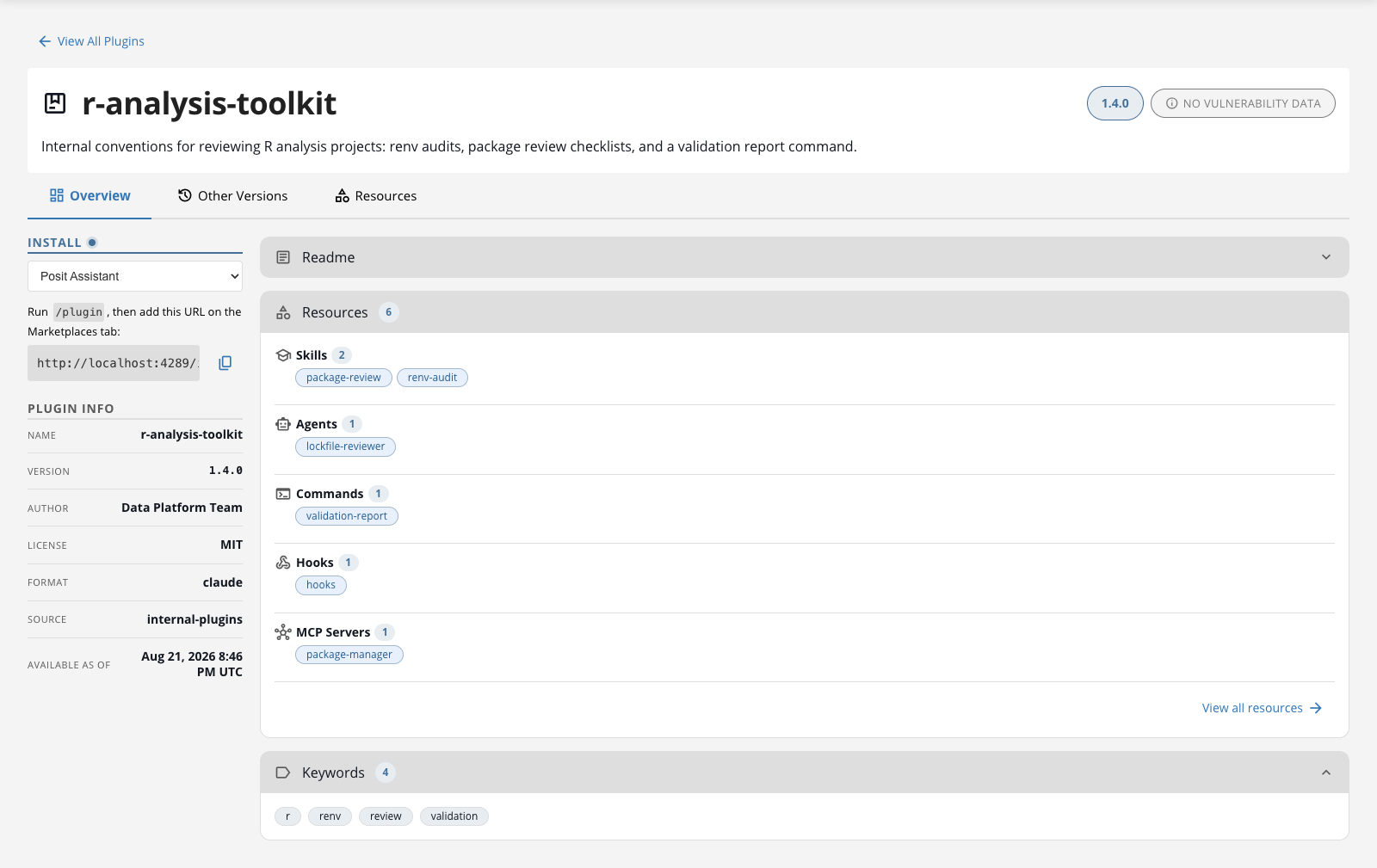
A detail page lists every resource a plugin declares, but clients differ in which ones they act on. For example, Posit Assistant runs a plugin’s skills and MCP servers, and displays its sub-agents, hooks, and LSP servers without running them. Consult your client’s documentation for what it supports.
Plugin detail pages support the full Custom Metadata feature set. Administrators can attach arbitrary key-value pairs to a plugin and add tab.* custom tabs that appear on the detail page alongside the built-in tabs. The detail page also renders a README when a top-level README.md is present in the plugin bundle. An Other Versions tab lists all published versions of the plugin. Use rspm create metadata with --repo to scope metadata to a specific plugins repository, exactly as you do for any other package type.
Security considerations
Package Manager does not vet, sign, or sandbox plugin contents. After publication, Package Manager keeps each plugin version unchanged. Immutability is not a safety check: it preserves exactly what was published. Client tools can run plugin content on the machines of the people who install it, so treat publishing as a privileged operation:
Audit who holds the
global:adminscope, which is required to create sources and repositories and to edit an existing git builder’s URL.Audit who holds
sources:writeon an agent plugin source as well. That scope alone is enough to upload a bundle, and on a git agent plugin source it is enough to create a git builder pointing at any upstream URL. Creating a builder immediately enqueues a build, which publishes into every repository subscribed to that source. Grantsources:writeas narrowly as you would any publishing permission.Mirror only repositories that your organization or a trusted vendor controls.
Prefer building from tags rather than polling a branch, so a plugin’s contents cannot change without a deliberate release. The
--build-triggerflag defaults tocommits, which polls the default branch, so set it explicitly:Terminal
rspm create git-builder --source=git-plugin-src --url=https://github.com/example/my-plugin.git --build-trigger=tagsTags are not immutability on their own. If an upstream tag moves, Package Manager rebuilds it under the same tag-derived version, and the
latestsnapshot then serves the new content under the unchanged version string. Snapshots pinned before the rebuild keep serving the original content. Protect tags upstream, and pin clients to a dated snapshot URL when the historical identity of a version matters.
Authentication
A plugins repository is not authenticated unless you create it with --authenticated or set Authentication.NewReposAuthByDefault. Any client that can reach the server can clone an unauthenticated repository. To require authentication on a repository that already exists:
Terminal
rspm edit repo --name=<repo> --authenticated=trueA plugin can contribute hooks, MCP servers, and language servers that a client tool runs on the machine of everyone who installs it. Authenticate any repository whose contents are not meant to be public.
Like other Package Manager repositories, you can restrict agent plugin repositories to authenticated users with a Package Manager API token. Create the repository with --authenticated, or set Authentication.NewReposAuthByDefault to require authentication for new repositories by default. Issue users a token with the repos:read scope (optionally limited to specific repositories). See Token Authentication for details.
Clients access plugins over a read-only Git endpoint. They authenticate to a private agent plugin repository using HTTP Basic authentication with the username __token__ and a Package Manager API token as the password. Every supported client (Posit Assistant, Claude Code, VS Code, and npx skills) installs plugins by cloning that endpoint, but each one takes the token in a different place. See Installing AI Agent Plugins in the User Guide for the per-client configuration.
To hand users a repository that is already registered, pre-provision the marketplace with the extraKnownMarketplaces setting in a Posit Assistant user or project settings file. Positron, RStudio, and the terminal all read those same files, so one entry registers the repository in all three and users do not need to add the URL by hand. To enforce the setting centrally, deliver it in the POSIT_ASSISTANT_SETTINGS_ENFORCED environment variable from a managed launcher such as Posit Workbench. Every client reads that variable as well, and a user cannot override it. Entries merge by marketplace name, and a project settings file cannot repoint a name the user or the administrator has already registered at a different URL. See Configuration file and Administrator-Managed Settings in the Posit Assistant documentation.