Package Requests
EnhancedAdvanced
Package requests is an experimental feature and is disabled by default. See Enable package requests.
With package requests, users can ask for packages that are not in a repository yet. A reviewer approves or denies each package, and Posit Package Manager adds the approved packages to a curated source of the repository.
Package requests are for regulated or locked-down environments, where a curated source contains only packages that someone reviewed. Users can request packages in Package Manager so every request and decision is in one place. If you only need to block packages that break a policy, use blocklist rules instead. Blocklist rules can block vulnerable packages, packages with a given license, and recently published versions.
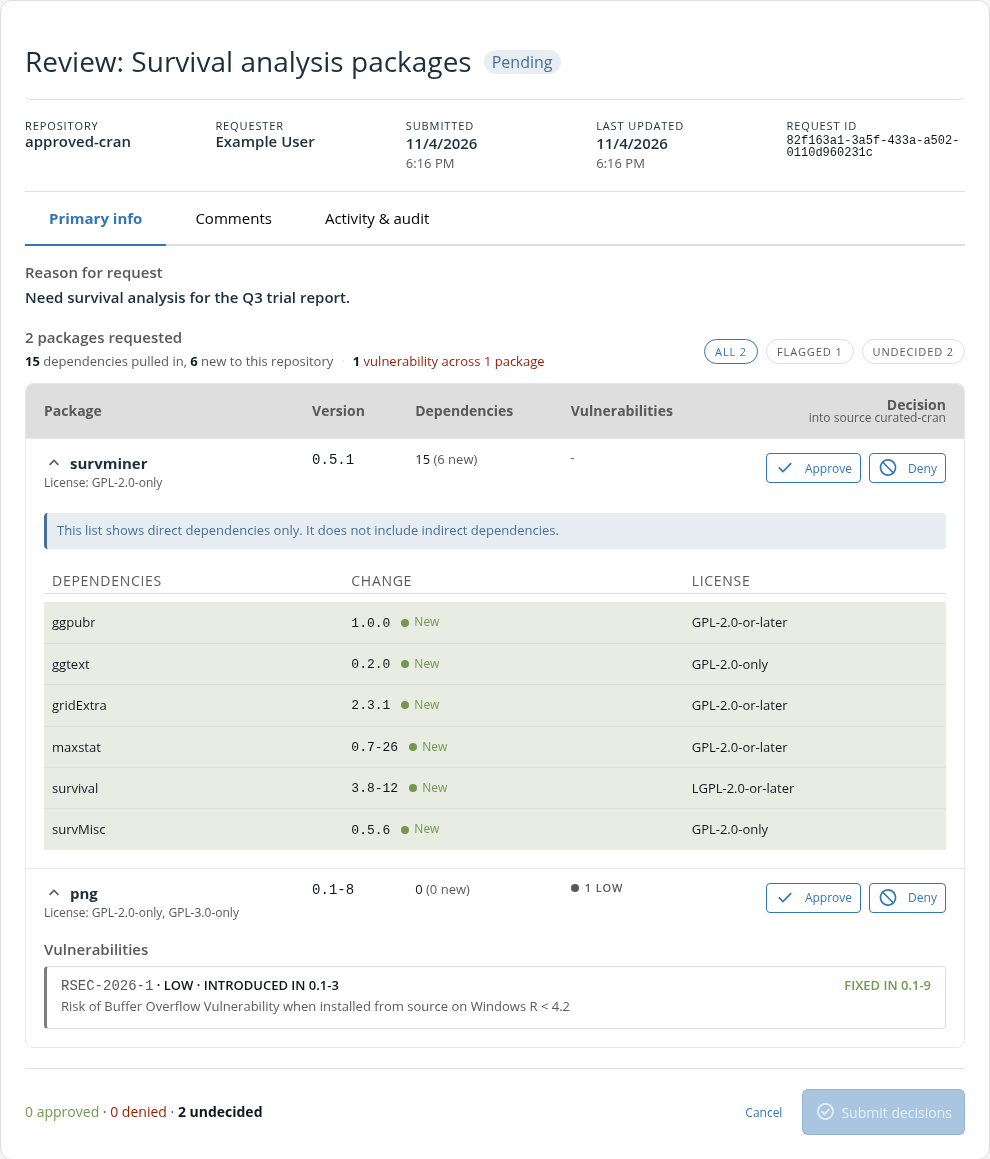
Before they approve or deny a package, reviewers see the license, known vulnerabilities, and dependencies of each package. Each request keeps a full history: who asked and why, who approved or denied each package, and the reason for each denial. If you enable the audit log, it also records every submission, edit, withdrawal, and review.
How it works
- A signed-in user chooses a repository, selects packages and versions they would like to request, and gives a reason.
- A reviewer approves or denies each package. If more than one curated source of the repository accepts requests, the reviewer chooses the target source.
- Package Manager adds each approved package and its dependencies to the target source, at the source’s current snapshot. Every repository that subscribes to that source then serves them.
For the requester’s steps, see Package Requests in the User Guide.
Requirements
- A curated source with requests enabled, and a repository that subscribes to it
- For each requester, a sign-in with
repos:readaccess to the repository, even when the repository serves packages without authentication - For each reviewer, a sign-in with
package_requests:adminorglobal:admin
Limitations
Package requests add packages to curated CRAN, PyPI, and Open VSX sources. They have these limitations:
- Package requests do not support Bioconductor packages or curated Bioconductor sources.
- Git sources, local sources, and other source types do not accept requests.
- Requests do not update a source’s snapshot or add packages from another snapshot date. To make newer versions available, run
rspm updateon the source with a later--snapshotdate. For a curated PyPI or Open VSX source, see the warning in Enable package requests. - Users cannot request packages with a requirements file, such as
requirements.txt. They add each package on the request form. - Deleting a repository also deletes its completed requests. The audit log keeps their entries.
Enable package requests
Enable Package Requests on the Experimental Features settings page, or run this command.
Terminal
rspm config experimental enable package_requestsEnable requests for each curated source that will receive requested packages. A source does not accept requests until you enable them.
Terminal
rspm edit source --name=<source> --enable-package-requestsFor a new source, add the flag when you create it:
Terminal
rspm create source --name=<source> --type=curated-cran --enable-package-requestsA curated PyPI source must have a snapshot before it can receive approved packages. To check, list your sources:
Terminal
rspm list sourcesA curated PyPI source with no snapshot shows
Curated PyPI - None. Update that source once.Give each requester a sign-in with
repos:readaccess to the repository.Advanced Requesters can sign in with single sign-on (SSO) through OpenID Connect. Grant them
repos:readwith scope mapping.Without SSO, give each requester an API token. See Creating API Tokens. Give each requester’s token its own
--uservalue, because tokens with the same value see the same requests.
rspm update --file-in removes approved packages
rspm update --file-in replaces the packages in a curated source with the packages in your requirements file. Approvals do not change your requirements file, so the update removes packages added by approved package requests. After reviewers approve packages for a source, do not run rspm update --file-in on it.
For curated PyPI and Open VSX sources, rspm update cannot change only the snapshot date. Updating the snapshot date also replaces the source’s packages.
To pause requests for one source, run rspm edit source with --disable-package-requests. Pending requests stay open, but reviewers cannot approve packages into that source.
Give reviewers access
Reviewers need the package_requests:admin scope. This scope covers every repository and grants no other administrator access. Users with global:admin can also review. Reviewers cannot approve packages in their own requests, except users with global:admin.
Advanced For OpenID Connect users, map the scope with scope mapping.
Without SSO, give each reviewer a token with package_requests:admin. See Creating API Tokens or Permission Scopes.
Set up email notifications
Package Manager sends email notifications for package requests. It notifies each reviewer address when a user submits a request. It notifies the requester when a reviewer approves or denies the request. A requester can opt out on the request form: clear Email me when this request is approved or denied.
To send these notifications, configure a mail provider, then add the reviewer addresses and the server URL:
/etc/rstudio-pm/rstudio-pm.gcfg
[Server]
Address = https://packagemanager.example.com
PackageRequestReviewerEmail = reviewers@example.com
PackageRequestReviewerEmail = security-team@example.com
We recommend a mail group as the reviewer address, so you can change who reviews without editing the configuration. Give one address on each line, without a display name. The email notifications use Server.Address to link to the request. For the limits, see Server.PackageRequestReviewerEmail.
Package Manager sends requester email notifications to the token email, or to the verified address from OpenID Connect. A requester with no address receives no email notifications.
Review requests
Reviewers who are not administrators open Review package requests in the user menu. Administrators open Settings, then Package requests under Manage.
For a version range, the vulnerability check covers at most 10 matching releases. For R packages and Open VSX extensions, an approval adds the whole range, so the source can serve matching releases that the check did not cover.
Denying a package also denies each requested package that depends on it. You give one reason for all the packages you deny in a review. The requester sees it on the request.
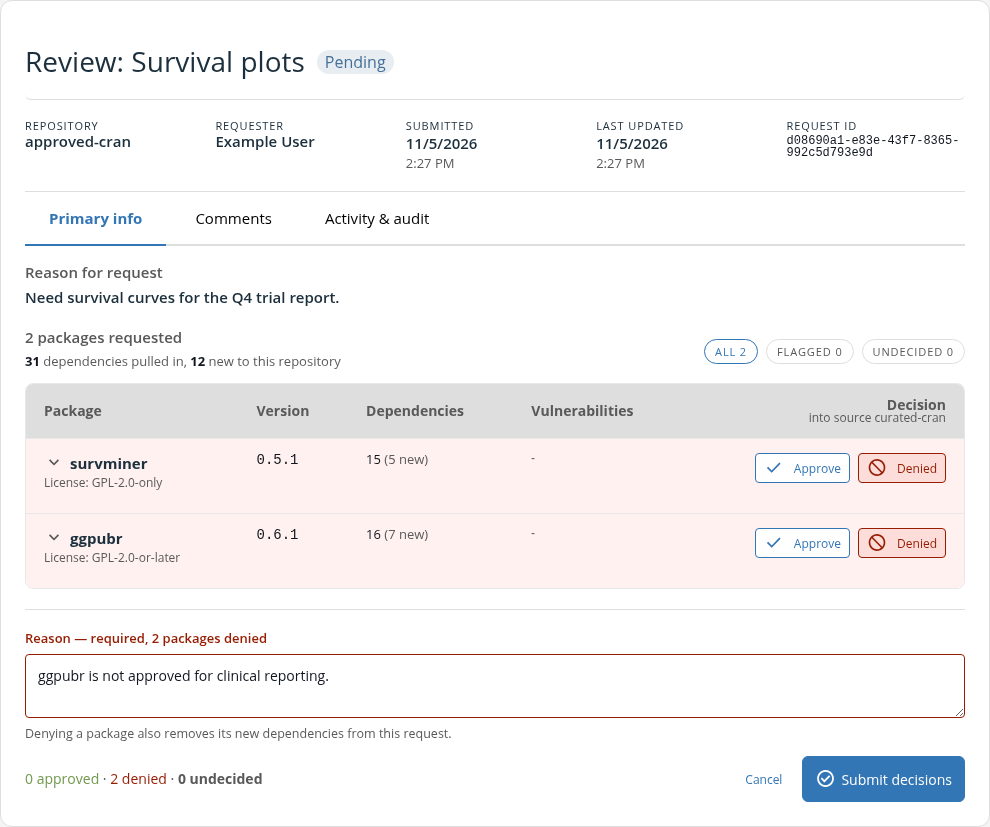
To ask the requester a question, comment on the request. Package Manager does not send email notifications for comments.
When an addition fails
An addition fails when Package Manager cannot add a package to the source. For example, after the approval, an update moves the source’s snapshot to a date that does not have the package. The request then shows Not added.
- Open the request from Package requests in Settings, or from Review package requests in the user menu.
- Read the error for each failed source.
- If another source is still adding packages, wait for it to finish.
- Fix the cause that the error names. If the snapshot does not have the package, update the source to a snapshot date that has it. See updating a curated CRAN, PyPI, or Open VSX source. For a curated PyPI or Open VSX source, see the warning in Enable package requests.
- If every source failed, click Decide again. Otherwise, ask the requester to submit a new request for the missing packages.