Integrating Posit Connect with Posit Package Manager
Posit Package Manager is a repository management server product that makes it easy to organize and centralize packages at your organization. Package Manager can help if your organization needs offline access to CRAN or PyPI, package access restrictions, internal package sharing, or other special package management needs. To learn more, visit the Package Manager Product Page and speak to your dedicated Posit Customer Success contact.
Configuring Package Manager for R
This section explains how to use Posit Package Manager repositories rather than the CRAN mirror or other R package repository URLs referenced by R content.
First obtain the repository link from Package Manager:
Visit the Posit Package Manager in your browser.
Select your repository from the Repository drop-down menu in the middle of the screen.
Click SETUP.
Select Linux as the Operating System.
Use the Linux Distribution section to select if you want source packages only, or binary packages. To deliver compatible binary packages, select your Linux distribution from the drop-down menu.
Under Snapshots, select whether you want the most recent packages available, or if you want to freeze package versions from a specific date.
ImportantFreezing your repository to a date can lead to users attempting to deploy content containing package versions that did not exist at that date. If that happens, their content will fail to build because it cannot find necessary packages.
Select Posit Connect under Environment.
Under Repository URL, copy the URL.
Next, update the configuration file with the URL that you copied in the previous step:
/etc/rstudio-connect/rstudio-connect.gcfg
[RPackageRepository "CRAN"]
URL = "<the URL you copied>"
For additional information, please see the r-package-repositories section and the RPackageRepository section of the Appendix.
If your Package Manager instance requires authentication for R repositories, see authenticated repositories below.
Configuring Package Manager for Python
Posit Package Manager can serve as a Python package repository by mirroring PyPI. This section explains how to configure Posit Connect to install Python packages from Package Manager.
Getting the repository URL
- Visit Posit Package Manager in your browser.
- Select your Python repository from the Repository drop-down menu.
- Click SETUP.
- Under Environment, select Posit Connect.
- Under Repository URL, copy the URL.
The URL will look something like https://packagemanager.company.com/pypi/latest/simple.
Configuring Connect to use Package Manager for Python
The recommended approach is to configure Package Manager as a Python package repository directly in the Connect configuration file.
To use Package Manager as your only Python package source, use strict resolution to prevent content from using other indexes:
/etc/rstudio-connect/rstudio-connect.gcfg
[Python]
PackageRepositoryResolution = strict

[PythonPackageRepository "PyPI"]
URL = https://packagemanager.example.com/pypi/latest/simple
Alternatively, you can configure the package installer directly. For uv, add the following to /etc/uv/uv.toml:
/etc/uv/uv.toml
[[index]]
url = "https://packagemanager.company.com/pypi/latest/simple"
default = true
For pip, add the following to /etc/pip.conf:
/etc/pip.conf
[global]
index-url = https://packagemanager.company.com/pypi/latest/simple
When PythonPackageRepository is configured, the indexes Connect passes on the command line override the default index from pip.conf, uv.toml, or the PIP_INDEX_URL / UV_INDEX_URL environment variables. Extra indexes from pip.conf (extra-index-url) and uv.toml ([[index]] entries) remain active, so configuring extra indexes in both places means the installer searches the union of both sets. See Precedence with pip.conf and uv.toml for the full precedence rules.
For more details on configuring uv and pip, see Configuring package installer in the Python package management documentation.
Authenticated repositories
Connect ships with a dedicated Package Manager integration which can be used to authenticate to package repositories. When enabled, deployments will automatically receive short-lived access tokens for these repositories, provided that the content owner has access to the integration.
Enabling this integration involves two steps, one on each of the products involved:
- Step 1: A Package Manager administrator configures identity federation with Connect.
- Step 2: A Posit Connect administrator creates a Package Manager integration within Connect.
This guide walks through both steps of this process.
Connect and Package Manager must share two-way network connectivity for this integration to function.
Step 1: Package Manager administrator
The Package Manager administrator configures Package Manager for identity federation.
Specifically, the Package Manager administrator should update the server settings to include a section like the following:
/etc/rstudio-pm/rstudio-pm.gcfg
[IdentityFederation "connect"]
Issuer = "https://connect.company.internal/"
Audience = "package-manager"
Subject = "connect"
RoleClaim = "roles"
Replace connect.company.internal with the address of the Connect server, and ensure that it ends with a trailing slash.
Step 2: Posit Connect administrator
The Posit Connect administrator creates a Package Manager integration through the dashboard’s System > Integrations settings. Once the integration has been created in Connect, it is available for use by all publishers by default. See access control below for information on limiting access to specific users or groups.
Select Add and Test Integration to check the configuration. The test requests an access token from Package Manager with the same identity token that a content build uses. If the test fails, the message names the URL that Connect contacted and the answer from Package Manager.
Complete Step 1 before you test the integration. A Package Manager server without an [IdentityFederation] section rejects the token exchange.
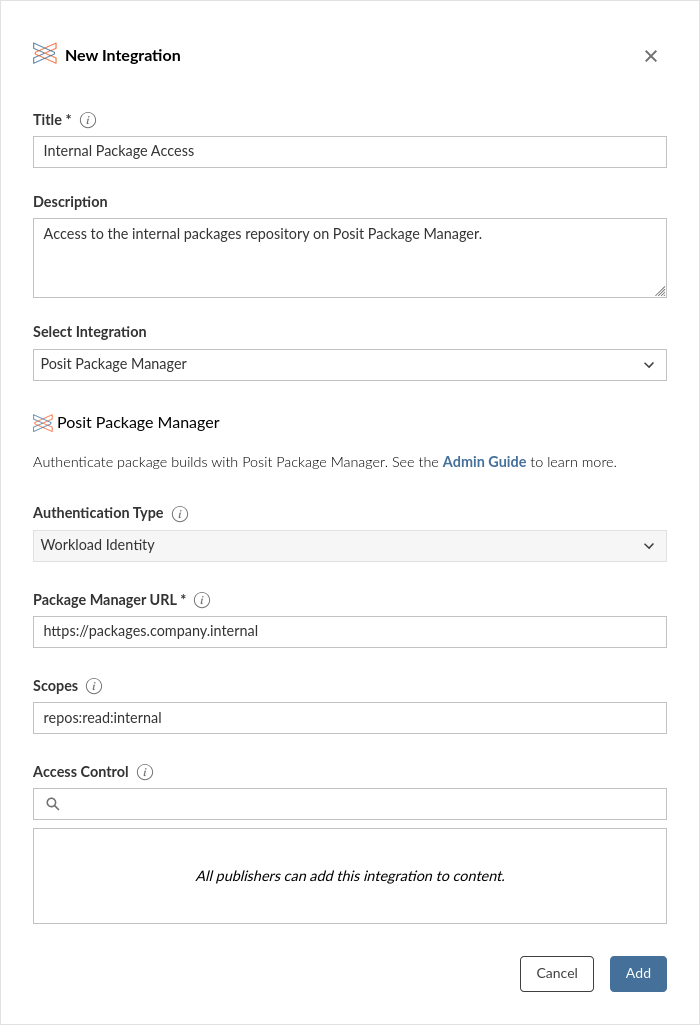
Alternatively, the example below shows how to create an integration using curl and the Connect Server API.
Terminal
curl -H "Authorization: Key ${CONNECT_API_KEY}" \
  -XPOST ${CONNECT_SERVER}/__api__/v1/oauth/integrations \
  --data '{
    "template": "ppm",
    "name": "Internal Packages Access",
    "description": "Access to the internal packages repository on Posit Package Manager.",
    "config": {
      "ppm_url": "https://packages.company.internal",
      "scopes": "repos:read:*"
    }
  }'
# 200 OK
# {"guid": "<oauth-integration-guid>", ... }
Controlling access with ACLs
You can restrict which users and groups can use a Package Manager integration via the integration’s access control list (ACL). When an ACL is set for the Package Manager integration, deployments will only have access to repository credentials if the content owner is in this list. Publishers who do not have access to any Package Manager integrations will have their builds proceed without Package Manager authentication which may result in package installation errors in the content build logs.
Removing a publisher from a Package Manager integration ACL will prevent them from using that integration for any new content deployments. The publisher’s existing content will only be impacted when their content gets rebuilt.
Deploying content with integrations
Package Manager integrations do not need to be manually added to content or specified in the integration_requests section of the manifest.json file to function. Once enabled, an integration automatically allows the content build process to use short-lived access tokens for package restoration from configured authenticated repositories.
Multiple integrations
Connect supports multiple Package Manager integrations, which is useful when:
- You have multiple Package Manager instances (e.g., production and development).
- Different groups of users need access to different scopes (e.g. distinct repositories per business unit).
When a content owner has access to multiple Package Manager integrations, Connect aggregates credentials from all of them.
Troubleshooting a failed token exchange
Connect requests a Package Manager access token for every R and Python build, once for each Package Manager integration that the content owner can use. If a request fails, Connect writes a warning to the build log and the build continues. The warning names the integration and the URL that Connect contacted.
Content that needs authenticated access to Package Manager then fails during package installation. That error names the repository and the package. Content that uses only public repositories is not affected.
Four configuration mistakes cause a failed request:
- The Package Manager URL does not point at a Package Manager server. Package Manager answers a token request at
/__api__/token. A different server, such as a repository proxy, answers with status 405. - The Package Manager server has no
[IdentityFederation]section. Package Manager answers with status 400 and the errorinvalid_target. - The
Issuervalue in the Package Manager[IdentityFederation]section does not match the address of the Connect server. Package Manager answers with status 400 and the errorinvalid_target. The two values must match exactly, including the scheme and the trailing slash. - The Package Manager server does not accept API tokens. Package Manager answers with status 403 and reports that API token authentication is disabled. Set
Authentication.APITokenAuthtotrueon the Package Manager server.
Posit Package Manager URL rewriting
Posit Package Manager can serve R packages as source or precompiled binaries. Precompiled binaries install much faster, but are only compatible with the Linux distribution for which they were compiled. For more detail, see Posit Package Manager documentation on Binary Packages and Using Linux Binary Packages.
Package Manager URL rewriting only applies to Posit Package Manager URLs. Other R package repositories (e.g. vanilla CRAN mirrors, Bioconductor, Artifactory, or filesystem repositories) are not affected.
The type of package served by Posit Package Manager is determined by the URL. For instance, https://packagemanager.posit.co/cran/latest serves source packages, while https://packagemanager.posit.co/cran/__linux__/jammy/latest serves binary packages for Ubuntu 22.04.
Use the setting R.PositPackageManagerURLRewriting to control how Connect downloads packages from a Posit Package Manager instance. This setting affects both repositories configured on Connect using RPackageRepository, and arbitrary repository URLs in published content.
The R.PositPackageManagerURLRewriting setting takes one of five values:
auto(default): Incompatible Posit Package Manager binary URLs are rewritten to use compatible binaries, if they are served by the Package Manager instance. Otherwise, they are rewritten to use source packages. Source package URLs, compatible binary URLs, and other repository URLs are unmodified.force-source: All Posit Package Manager URLs are rewritten to use source packages.force-binary: All Posit Package Manager URLs are rewritten to use binary packages, assuming they are served by the Package Manager instance. Otherwise, they are rewritten to use source packages. Portable binary packages are not rewritten to distribution-specific ones.force-portable: All Posit Package Manager URLs are rewritten to use portable binary packages.none: Disables all modification of Posit Package Manager URLs. Repository URLs from theRPackageRepository.URLConnect configuration setting and from deployed content are used as-is. For example, usenoneif the configured URLs are correct but the host Linux distribution is not detected as supported by Posit Package Manager.
Example
With the default behavior (R.PositPackageManagerURLRewriting = auto), Posit Connect rewrites incompatible Posit Package Manager binary URLs and leaves all other URLs unmodified. For example, on Ubuntu 22.04 (Jammy):
https://packagemanager.posit.co/cran/latestis unmodified, because it installs source packages.https://packagemanager.posit.co/cran/__linux__/jammy/latestis unmodified, because it installs compatible binary packages.https://packagemanager.posit.co/cran/__linux__/manylinux_2_28/latestis unmodified, because it installs compatible binary packages.https://packagemanager.posit.co/cran/__linux__/focal/latestis rewritten tohttps://packagemanager.posit.co/cran/__linux__/jammy/latest, because it installs binary packages compiled for a different version of Ubuntu.
To rewrite all URLs to install source packages, use:
/etc/rstudio-connect/rstudio-connect.gcfg
[R]
PositPackageManagerURLRewriting = force-source
To rewrite all URLs to install compatible binaries:
/etc/rstudio-connect/rstudio-connect.gcfg
[R]
PositPackageManagerURLRewriting = force-binary