From GitHub Actions
You can publish content to Posit Connect from a GitHub Actions workflow, so that your content is updated automatically as part of your CI/CD process. Posit maintains the posit-dev/connect-actions actions for this purpose. They let you:
- Keep the deployed version of your content in sync with the code on your default branch.
- Deploy only when your tests pass.
- Preview a change as a draft on Connect before it goes live for everyone.
- Publish without storing a long-lived API key, using trusted publishing.
GitHub Actions or Git-backed content?
Both GitHub Actions and Git-backed content keep your deployed content in sync with a repository, but they work in opposite directions.
With Git-backed content, Connect polls a branch and redeploys when it changes. It is quick to set up from the Connect interface and needs no CI/CD system, but Connect stores a single Git credential per host, cannot run your tests before deploying, and must be able to reach the repository.
With GitHub Actions, your pipeline drives the deployment. You can run tests and deploy only when they pass, trigger a deploy on any event such as a push, a pull request, a schedule, or a manual run, preview pull requests as drafts before they go live, and deploy to more than one server. Authentication is per repository, using trusted publishing or a repository secret, so there is no shared per-host credential. In exchange, you maintain a workflow file.
Requirements
- The content must already exist in Connect. The
deployaction updates an existing content item; it does not create one. Deploy the first version by another means, such as the Posit Publisher extension orrsconnect-python. - Your dependencies must be checked in. For Python content, include a
requirements.txtor auv.lockfile. For R content, generate amanifest.jsonwithrsconnect::writeManifest().
Set up
The quickest way to add these workflows is the bundled Agent Skill (setup-connect-deploy), which walks a coding agent through checking your prerequisites, reading your deployment file, and writing the workflow for you. In Claude Code, install it as a plugin and then ask the agent to set up Connect deployment for your repository:
/plugin marketplace add posit-dev/connect-actions
/plugin install connect-actions@posit-dev
Authenticate
The deploy action needs to know where to publish and how to authenticate.
For the destination, provide the connect-server URL and content-guid directly, or point deployment-file at the .posit TOML file that Posit Publisher writes. If you provide none of these and there is a single deployment file under .posit/publish/deployments/, the action uses it automatically.
For authentication, trusted publishing is recommended when your server supports it. It lets a workflow publish to a specific content item without a stored API key, by exchanging a short-lived OpenID Connect (OIDC) token for a Connect access token.
Trusted publishing has two sides. In Connect, you authorize a publisher for your content on its Source settings; see Trusted publishing for the steps. In your workflow, you add id-token: write to the job’s permissions so the action can request an OIDC token. No secret is required.
If trusted publishing is not an option, pass connect-api-key, referencing a GitHub Actions secret such as ${{ secrets.CONNECT_API_KEY }}. Never write an API key directly in a workflow file.
Deploy on push
The default behavior deploys and activates your content on push events. This example uses trusted publishing and reads the server URL and content GUID from a checked-in Publisher deployment file, so no secret is needed:
.github/workflows/publish.yml
name: publish

on:
  push:
    branches: [main]

jobs:
  deploy:
    runs-on: ubuntu-latest
    permissions:
      contents: read
      id-token: write
    steps:
      - uses: actions/checkout@v7
      - name: Deploy to Connect
        uses: posit-dev/connect-actions/deploy@main
To specify the destination explicitly and authenticate with an API key instead:
.github/workflows/publish.yml
      - name: Deploy to Connect
        uses: posit-dev/connect-actions/deploy@main
        with:
          connect-server: https://connect.example.com
          content-guid: 12345678-abcd-1234-abcd-1234567890ab
          connect-api-key: ${{ secrets.CONNECT_API_KEY }}
A real workflow usually does more than deploy. Because your pipeline controls when the deploy runs, you can add steps that run your unit tests and other validations first, and deploy only if they pass, so code with problems never reaches Connect. This control over what gets deployed is one of the main advantages over Git-backed publishing.
Preview pull requests with drafts
On pull_request events, the deploy action deploys a draft: the bundle is uploaded to Connect but not activated, so the previously active version keeps serving to everyone else. The action then comments the preview URL on the pull request, so reviewers can open the draft on Connect before it goes live. When the pull request merges to your default branch, the push deploys and activates the change for everyone.
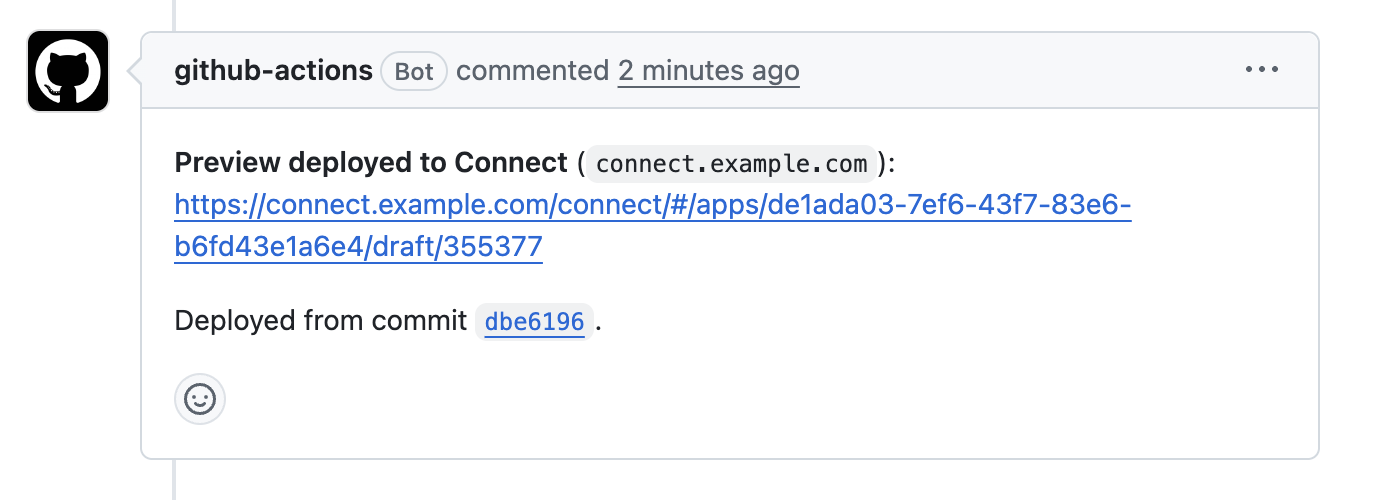
To comment on pull requests, give the job pull-requests: write permission and pass github-token:
.github/workflows/publish.yml
on:
  push:
    branches: [main]
  pull_request:
    branches: [main]

jobs:
  deploy:
    runs-on: ubuntu-latest
    permissions:
      contents: read
      id-token: write
      pull-requests: write
    steps:
      - uses: actions/checkout@v7
      - name: Deploy to Connect
        uses: posit-dev/connect-actions/deploy@main
        with:
          github-token: ${{ github.token }}
Draft bundles created for previews are not removed automatically. Add a second workflow using the cleanup-previews action to delete them when the pull request closes. It finds the bundles to delete from the preview comments the deploy action left on the pull request. Cleaning up previews also keeps your bundle history tidy, so it contains only the versions that were actually deployed to Connect:
.github/workflows/cleanup-previews.yml
name: cleanup PR previews

on:
  pull_request:
    types: [closed]

jobs:
  cleanup:
    runs-on: ubuntu-latest
    permissions:
      contents: read
      id-token: write
      pull-requests: write
    steps:
      - uses: actions/checkout@v7
      - name: Cleanup preview bundles
        uses: posit-dev/connect-actions/cleanup-previews@main
        with:
github-token: ${{ github.token }}You can override the default with the draft input: set draft: false to publish directly from a pull request, or draft: true to stage a draft from a push.
Bundle metadata
The action records information about the source of each bundle as bundle metadata: the commit, author, and branch, plus the pull request number and title on pull requests. This lets you trace a deployed version back to the commit and workflow run that produced it. On a pull request, the draft preview shows the pull request title, with a link back to GitHub, so reviewers know what they are looking at.

More options
The deploy action composes to cover more involved setups, such as deploying the same content to several servers, deploying pull requests to a separate staging server, or deploying multiple apps from one repository with the path input. See the connect-actions README for the full input and output reference and complete examples.