Posit Team architecture
Overview
The Posit Team Native App manages the installation and lifecycle of Posit products within Snowpark Container Services: Posit Workbench, Posit Connect, and Posit Package Manager. Administrators can choose which products to install.
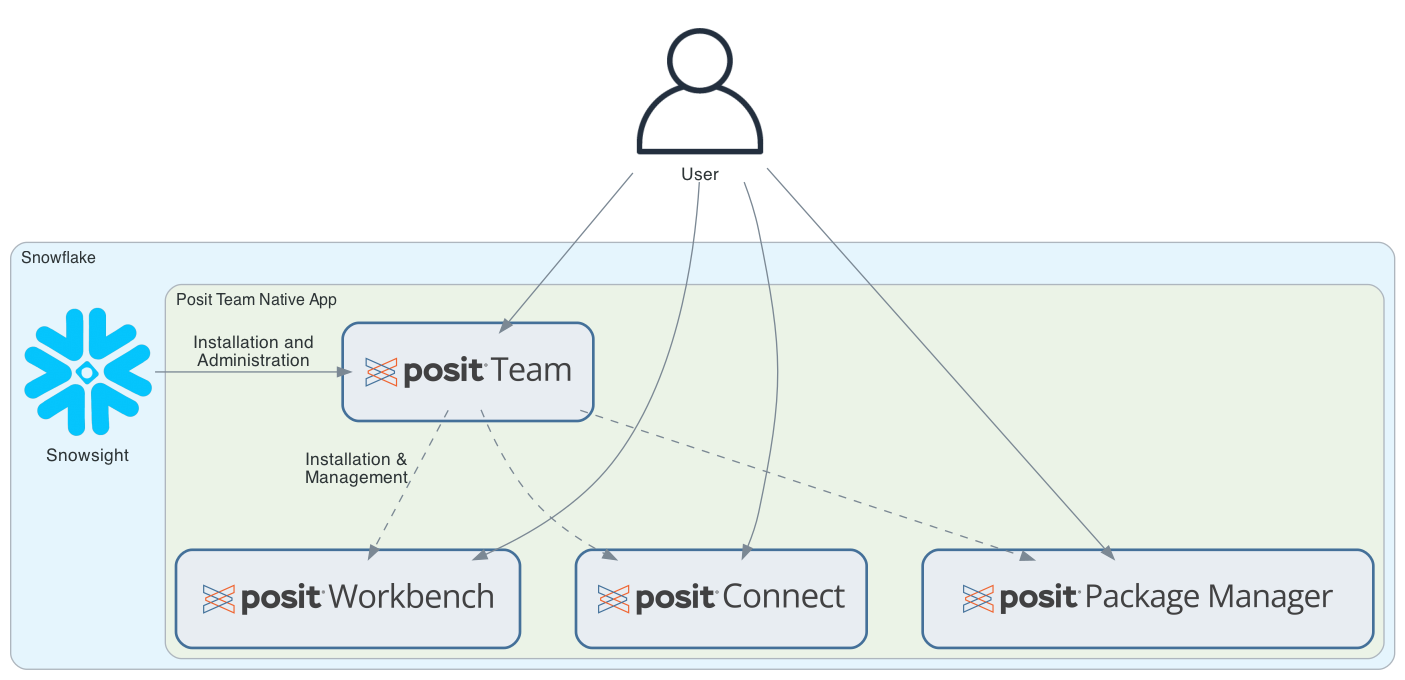
Administrators install and manage Posit Team through Snowsight, then configure individual Posit products through Posit Team.
Components
Posit Team controller
The Posit Team controller is the central management component of the Native App. When you visit Posit Team from Snowsight, you are interacting with the controller. It provides:
- A unified landing page for accessing all Posit products
- Installation and configuration for each product
- Lifecycle management (e.g., start, stop, upgrade) for each product
- Centralized access management through Snowflake application roles
The controller manages each product independently, allowing administrators to start, stop, and configure Workbench, Connect, and Package Manager based on their organization’s needs.
See the Posit Team installation instructions to get started.
Posit Workbench
Posit Workbench is a development environment for data scientists. Within the Posit Team Native App, Workbench provides:
- Positron, RStudio, VS Code, and other popular IDEs for data science
- Direct access to Snowflake data through managed credentials
- Persistent home directories backed by block storage
See Workbench setup for configuration details.
Posit Connect
Posit Connect is a publishing platform for data products created in R and Python. Within the Posit Team Native App, Connect enables:
- Publishing and hosting of Shiny apps, Quarto documents, APIs, and many other artifacts
- Scheduled report generation and distribution
- Secure sharing of data products within your organization
See Connect setup for configuration details.
Posit Package Manager
Posit Package Manager is a repository management server for R and Python packages. Within the Posit Team Native App, Package Manager provides:
- Centralized package repositories for your organization
- Curated package sets with security and compliance controls
- Offline package access within Snowflake
See Package Manager setup for configuration details.
User access
Users access Posit Team products in several ways:
- Via Snowsight: Navigate to the installed app in your Snowflake account and launch the Posit Team landing page
- Posit Team URL: Access Posit Team directly and navigate to each configured product
- Direct URL: Access products directly using the service URLs provided after installation
Snowflake OAuth handles authentication to Posit Team and each product, providing single sign-on for users.
Administration
Administrators use Snowsight to:
- Install the Posit Team Native App from the Snowflake Marketplace
- Manage egress rules for Posit Team and each product
- Create OAuth integrations for use by Workbench and Connect
- Control user access through application roles
Technical details
The Posit Team Native App uses several Snowpark Container Services objects to deploy and manage products. This section describes these objects and how Posit Team uses them.
Resource provisioning happens at two stages:
- Posit Team installation: Snowflake creates the controller service and its compute pool when you install Posit Team from the Snowflake Marketplace.
- Product installation: The controller creates resources such as a per-product service, compute pool, volumes, and secrets when you install Workbench, Connect, or Package Manager.
This means you only pay for the resources associated with the products you choose to install.
Services
Each Posit product runs as a Snowpark Container Services service. A service is the primary runtime entity that executes containerized applications.
Posit Team creates the following services:
| Service | Description |
|---|---|
POSIT_TEAM.SERVICES.CONTROLLER |
The Posit Team management interface |
POSIT_TEAM.SERVICES.WORKBENCH |
Workbench development environment |
POSIT_TEAM.SERVICES.CONNECT |
Connect publishing platform |
POSIT_TEAM.SERVICES.PACKAGE_MANAGER |
Package Manager repository server |
Each service defines containers, network endpoints, volume mounts, and environment configuration. The controller lets you start, stop, and upgrade services.
Compute pools
Each product runs on a dedicated compute pool, which provides the compute resources for the service containers.
Posit Team creates separate compute pools for each product:
| Compute Pool | Default Instance Type |
|---|---|
POSIT_TEAM_CONTROLLER |
CPU_X64_XS |
POSIT_TEAM_WORKBENCH |
CPU_X64_S |
POSIT_TEAM_CONNECT |
CPU_X64_S |
POSIT_TEAM_PACKAGE_MANAGER |
CPU_X64_S |
Administrators can configure the instance type for each compute pool during product setup to match workload requirements. See Snowflake compute pool instance families for available options.
Block volumes
Products use block storage volumes for persistent data that requires filesystem semantics, such as databases and configuration files.
| Product | Volume | Default Size | Purpose |
|---|---|---|---|
| Workbench | home |
128 GiB | User home directories |
| Workbench | data |
1 GiB | Application data |
| Connect | data |
128 GiB | Application database and configuration |
| Package Manager | database |
50 GiB | Application database |
| Package Manager | data |
500 GiB | Package archives and metadata |
Block volumes persist across service restarts. Posit Team uses snapshots for block volume backups.
Secrets
Products use Snowflake secrets to securely store sensitive configuration such as product licenses and OAuth credentials. Snowflake mounts secrets into service containers as environment variables or files.
Common secrets used by products include:
- Posit product licenses
- OAuth client secrets for Snowflake authentication
- Bootstrap tokens for initial API access
- OpenID Connect (OIDC) client secrets for single sign-on
Network access
Products require network access both for inbound user connections and outbound connectivity to external services.
Inbound access: Each service exposes HTTP or HTTPS endpoints that provide public ingress URLs for user access.
Outbound access: Products use external access integrations with network rules to enable connectivity to external services such as:
- Online Certificate Status Protocol (OCSP) endpoints for certificate validation
- Package repositories (CRAN, PyPI, Bioconductor)
- Snowflake OAuth endpoints for authentication
Snowflake provisions a network rule and external access integration for each product from the application egress references when you install the application. Each of these names begins with the application name. For an application installed as POSIT_TEAM:
| Product | Network Rule | External Access Integration |
|---|---|---|
| Workbench | POSIT_TEAM_APP_DATA.CONFIGURATION.POSIT_TEAM_WORKBENCH_EGRESS_NETWORK_RULE |
POSIT_TEAM_WORKBENCH_EGRESS_EXTERNAL_ACCESS |
| Connect | POSIT_TEAM_APP_DATA.CONFIGURATION.POSIT_TEAM_CONNECT_EGRESS_NETWORK_RULE |
POSIT_TEAM_CONNECT_EGRESS_EXTERNAL_ACCESS |
| Package Manager | POSIT_TEAM_APP_DATA.CONFIGURATION.POSIT_TEAM_PACKAGE_MANAGER_EGRESS_NETWORK_RULE |
POSIT_TEAM_PACKAGE_MANAGER_EGRESS_EXTERNAL_ACCESS |
To find the exact names in an account, run SHOW EXTERNAL ACCESS INTEGRATIONS and DESCRIBE EXTERNAL ACCESS INTEGRATION <name>. The ALLOWED_NETWORK_RULES property lists the bound network rule. Administrators grant these external access integrations to the application during installation and can manage egress rules through Snowsight.
Snapshots
Posit Team supports snapshots for backing up block volume data. Snapshots capture the state of a volume at a point in time and can be used to restore data after accidental deletion or corruption.