Viewing Usage Stats
The Usage Stats page shows how often people download packages from Posit Package Manager. Use it to see which packages your organization relies on and which licenses those packages carry.
To open the page, choose a repository from the Package Manager home page. Then open the hamburger menu in the top-right corner of the repository selection card and select Usage Stats. The menu item does not appear if your administrator turns off usage statistics. See Usage data in the Admin Guide.
Choosing what to show
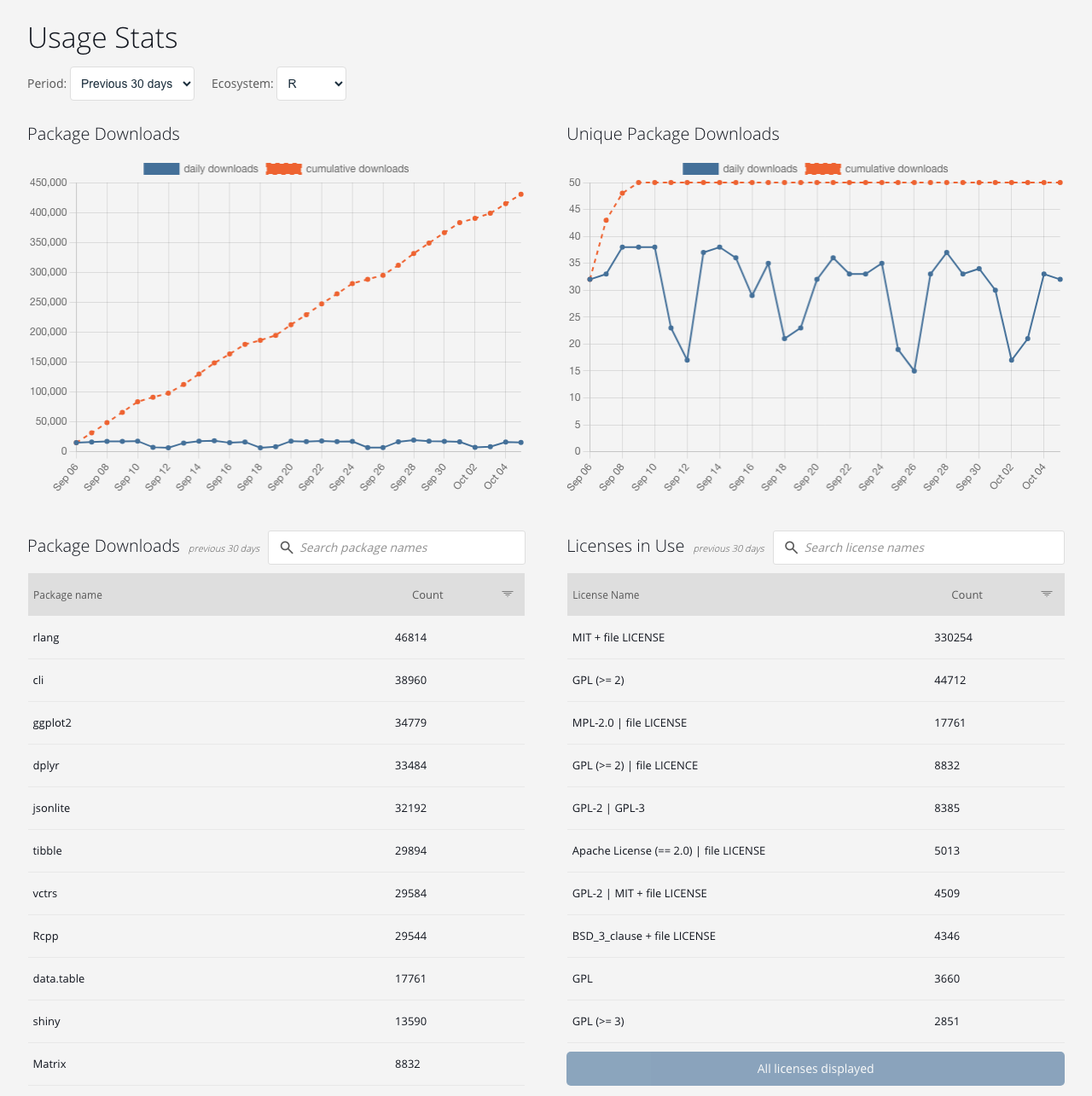
Usage Stats covers downloads from every repository on the server. Use the selectors at the top of the page to choose the time period and package ecosystem. R includes packages downloaded from CRAN and Bioconductor sources.
Statistics run through the end of the previous day in Coordinated Universal Time (UTC). Downloads made today appear tomorrow.
Reading the charts
- Package Downloads shows the number of package files downloaded each day, and a running total for the period.
- Unique Package Downloads shows the number of different packages downloaded each day, and the running total of different packages downloaded during the period.
Reading the tables
- Package Downloads lists each downloaded package with its download count for the period. Search by package name, or select a column header to sort by name or count. Select Get more packages to load more rows.
- Licenses in Use lists the licenses of the downloaded packages, with the number of downloads under each license. It has the same search and sort controls. Use it to check which licenses your organization depends on.