Compute Hours and the Background Execution Limit in Posit Cloud
The article will explain how Compute Hours are calculated in Posit Cloud (formerly RStudio Cloud) and how to use the Background Execution Limit to limit usage or enable the execution of long-running code.
It is important to understand how compute hours are calculated in Posit Cloud. Compute hours are calculated based on the formula (RAM + CPUs allocated) / 2 x hours.
The amount of time an Posit Cloud project will continue to execute code in the background without interaction is determined by the Background Execution Limit. The maximum value that can be set is based on the current plan. (See https://posit.cloud/plans/free) The instructions on how to set this limit are detailed in the Posit Cloud Guide at https://posit.cloud/learn/guide#project-settings-resources.
If you wish to reduce the number of compute hours a project runs in the background without user interaction, this can be set to a minimum value of 1 compute hour (assuming you have the minimum values for RAM/CPU set). If, on the other hand, you wish to allow a long-running process to keep running until it completes, this can be set to a high value which allows the process to complete. For example, let’s say you are using 1 CPU and 1GB of RAM so that 1 hour is equal to 1 compute hour. If the Background Execution Limit is set to 48, the project should continue running for up to 48 hours if it is actively executing code.
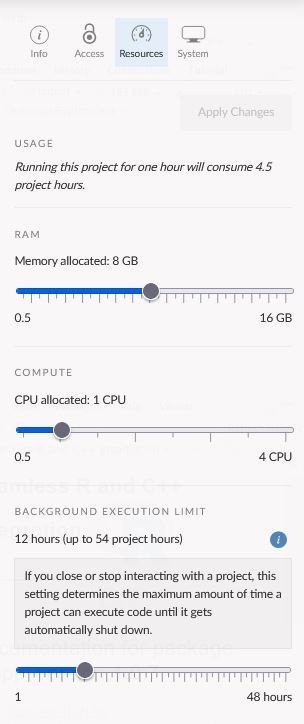
If the Background Execution Limit is set to a high value a project can quickly accumulate compute hours. For example, with the modest RAM/CPU settings of 8 GB RAM and 1 CPU, if the project continues to execute code, the project can consume up to 54 compute hours when the Background Execution Limit is set to 12 hours.
This example is shown in the following screenshot.
[
When using project sharing, these resources can be set for a project before sharing the project link. Please see Resource Settings for more information on how to set these.
Projects that are idle and not actively executing code will be suspended after 15 minutes of inactivity which results in the projects logging 1/4 of a compute hour as determined by the compute hour formula above. For example, With the above settings of 8 GB RAM and 1 CPU allocated, 4.5 compute hours are consumed every wall clock hour. So 15 minutes of inactivity will result in 1.125 compute hours being consumed.
What determines whether a project is idle or running (actively executing code)?
- If a project is actively executing R code, or for example running a shiny application, it is not considered idle.
- Logging out doesn’t make the project session go idle.
- Terminating R doesn’t make the project session go idle (it is automatically restarted).